Skip to content

Conversation

@khempenius
Copy link
Collaborator

@khempenius khempenius commented Feb 7, 2019

⚠️ This code is a preview of planned Lighthouse functionality. It is not intended for production use.

TLDR;

LightWallet adds performance budget tooling to Lighthouse. It supports page weight, request, and timing-based performance budgets. See #6053.

How to Use

Install this demo

$ git clone -b lightwallet [email protected]:GoogleChrome/lighthouse.git

$ cd lighthouse

$ npm install

Run Lighthouse

$ node lighthouse-cli https://www.example.com

LightWallet is run as a part of Lighthouse and requires no configuration. Out of the box LightWallet will use a default performance budget (which is based on page weight) to audit a page.

Result

default budget

Add a budgets.json file (optional)

Adding a budgets.json file overrides LightWallet's default budget with a custom performance budget.

The budgets.json file should be placed in the lighthouse/ directory.

Example budgets.json:

The below example uses all three of the metric types that LightWallet supports (page weight, request quantity, and timing). In addition, it uses two different network/CPU configurations when auditing the page.

{
  "budgets": [
    {
      "cpuThrottling": 4,
      "connectionType": "slow3G",
      "pageWeight": [
        {
          "resourceType": "script",
          "budget": 100
        },
        {
          "resourceType": "image",
          "budget": 50
        },
        {
          "resourceType": "stylesheet",
          "budget": 10
        },
        {
          "resourceType": "document",
          "budget": 20
        },
        {
          "resourceType": "font",
          "budget": 0
        },
        {
          "resourceType": "thirdParty",
          "budget": 20
        }
      ],
      "timings": [
        {
          "metric": "firstCpuIdle",
          "budget": 4000,
          "tolerance": 1000
        },
        {
          "metric": "timeToInteractive",
          "budget": 5000,
          "tolerance": 1000
        },
        {
          "metric": "firstMeaningfulPaint",
          "budget": 2000,
          "tolerance": 500
        }
      ]
    },
    {
      "cpuThrottling": 1,
      "connectionType": "wifi",
      "requests": [
        {
          "resourceType": "total",
          "budget": 100
        },
        {
          "resourceType": "thirdParty",
          "budget": 0
        }
      ]
    }
  ]
}

Result:

lightwallet custom budget

budgets.json API

budgets.json format:

{

	"budgets": <Array<budget>>

}

<budget>

<Object>. Attributes:

cpuThrottling: <cpuThrottling> (required)

connectionType: <connectionType> (required)

pageWeight: <Array<pageWeightBudget>> (optional)

requests: <Array<requestBudget>> (optional)

timings: <Array<timingBudget>> (optional)

<cpuThrottling>

<number>. One of 1,2,3, or 4. This represents 1x, 2x, etc. throttling.

<connectionType>

<string>. One of slow3G,regular3G, fast3G, slow4G, regular4G, or wifi.

<timingMetric>

<string>. One of firstContentfulPaint, firstCpuIdle, timeToInteractive, or firstMeaningfulPaint.

<string>. One of total, document, script, stylesheet, image,media, font, other, or thirdParty.

<timingBudget>

<Object>. Attributes:

metric: <timingMetric> (required)

budget: <number> (required) Time in milliseconds.

tolerance: <number> (optional) Time in milliseconds. If a tolerance is specified, the budget will only fail if the measurement exceeds budget + tolerance.

<PageWeightBudget>

<Object>. Attributes:

resourceType: <resourceType> (required)

budget: <number> (required) Resource size in KB.

<RequestBudget>

<Object>. Attributes:

resourceType: <resourceType> (required)

budget: <number> (required) Number of requests.


cc @addyosmani

Copy link
Contributor

@brendankenny brendankenny left a comment

Choose a reason for hiding this comment

The reason will be displayed to describe this comment to others. Learn more.

exciting!

Copy link
Contributor

@brendankenny brendankenny left a comment

Choose a reason for hiding this comment

The reason will be displayed to describe this comment to others. Learn more.

⬇️ ⬇️ ⬇️ ⬇️ ⬇️ ⬇️ ⬇️ ⬇️ ⬇️ ⬇️ ⬇️ ⬇️ ⬇️ ⬇️ ⬇️ ⬇️ ⬇️ ⬇️ ⬇️

Note for reviewers: for now let's concentrate on feedback on user experience, display in the report, and actionability before digging into the current implementation/lighthouse-dev experience.

Things may move around or change quite a bit before we figure out exactly how we want to integrate everything into the report, and focusing on i18n descriptions or ideal details renderer placement will just be a distraction :)

@paulirish
Copy link
Member

Here are two HTML reports using this branch.. roughly the same as the screenshots:

@patrickhulce
Copy link
Collaborator

Awesome very exciting!! Displaying multiple different connection types in one report is really interesting!

We had old ideas to try and do this in the performance section once upon a time but tabled it due to the extra complexity. This might be a good time to revisit that too! :D

I'm curious if we expect budgets on # of requests and byte weight to vary based on differences in connection quality or throttling. I'd probably expect these to vary more with form factor or the Save-Data header or something. Maybe we should consider including those in the budgets settings in the future?

@egsweeny
Copy link
Contributor

egsweeny commented Feb 7, 2019

There are a few considerations to discuss that I'd like feedback on.

  1. Resource vs transfer size (JS)
    • It is worth distinguishing between these for budgets being set.
  2. Default Budget and Chosen Budget/Configuration
    • Given that even for the MVP we want to ensure that you can set your own
      budgets, how will users indicate that they would like for us to utilize
      their configuration during the LH run in DevTools, PSI, and the extension?
    • How are we planning to approach a default budget (what is our
      methodology/justification for budget values)? Will it be changed at all in
      the context of Stack Packs/different use cases (i.e. for a publishing site
      vs interactive web app)?
  3. UI Options for Budget Surfacing
    • Option 0: Status Quo, LightWallet as a Separate Category
    • Option 1: Bullet Graph (LH Team Preferred Option)
      • Resources and usage timing can be measured against budgets visually.
        Thresholds for poor, satisfactory, and good budget presets can be
        indicated upon hover with a color scale (green, yellow, red similar
        to LH's current color scheme).
      • image
    • Option 2: Build Resource and Timing Measurements into Existing LH Report
      Categories (mostly performance)
      1. Then you can incorporate budget information within the line items of
        the standard report.
    • Option 3: Toggle view with and without budget information
    • Option 4: Separate panel with budget viewable while still in report
    • Option 5: Separate report for budget information

@paulirish
Copy link
Member

Last night, Elizabeth, Brendan, Shane and I spent some time talking about the UI side of this stuff. A few thoughts:

Feature scope

  • Rollout & default budge: I would like to ship Lightwallet with custom budget support before we enable a default budget. Once we turn on a default budget, we'll have a lot more angry people wanting to turn it off/configure/change, so let's ship first with opt-in and use the time to refine the UX.
  • Throttling profiles: I'd like to propose we nuke the throttling profiles from v1. (Or only support just one - our default preset). Supporting multiple adds a lot of complexity to the config and the report, and I think the user benefit isn't huge.

UX

  • Report category: Ideally this isn't a new category that's a sibling to Performance. I think it should all live within Performance.
  • Report UI: We didn't find consensus on if this data decorates existing Perf sections (metrics, etc) by default, only when chosen, or its an entirely different view. @kusler's UI Options for Budget Surfacing section above is exploring a few possibilities.
  • Resource-type breakdown: We currently show all the perf metrics in a big section. If we had a similar section for count/size of request (by resource type), then we could easily adjust that when a budget is applied. Maybe something like:
    image

And then if a budget is applied, we can use bullet graphs and add some cool annotations on hover:
image

(Apologies for the ugly mocks)

@patrickhulce
Copy link
Collaborator

  • I would like to ship Lightwallet with custom budget support before we enable a default budget.

+1

  • I'd like to propose we nuke the throttling profiles from v1. (Or only support just one - our default preset). Supporting multiple adds a lot of complexity to the config and the report, and I think the user benefit isn't huge.

+1

  • how will users indicate that they would like for us to utilize their configuration during the LH run in DevTools, PSI, and the extension?

I believe there was originally a plan to have us read budgets.json from the root of the site or something similar? Maybe we can have that be the way users can customize their budgets. Downside here would be that to apply different budgets a user would have to own the site/have deploy access.

  • Will it be changed at all in the context of Stack Packs/different use cases

This is a really interesting point to resurface. I would personally love to see something like this applied across perf scoring in general :)


I really dig the idea of a new resource types subsection of performance where we report stats by default and apply budgets directly ontop of if budgets are active. 👍

@khempenius
Copy link
Collaborator Author

Re: @kusler

#1. 1. Resource vs transfer size (JS)?
I should make this clearer- all LightWallet budgets and measurement are based on the transfer size of a resource.

Re: #2
How to set budgets.json outside of CLI?
The two options that have been discussed (a bit) are having users add budgets.json to their site and/or adding functionality for DevTools to read this from the local filesystem. We should probably discuss this more. I could also imagine that for the v1 this feature is only available via the CLI.

Default budget & platform packs, etc.?
I was planning that the default budget should be generic & conservative enough that the stack should not matter; i.e. you should still be loading in X seconds, regardless of platform.

Re: #3
See below comment on UI.

@khempenius
Copy link
Collaborator Author

+1 to everything mentioned above except the report UI.

I’m not particularly attached to the current tables/graphs, but I still think I prefer them over the the bullet graph styles.

These are probably the two biggest reasons for my opinions on the table/charts:

  • Should always look okay without relying on complex logic to determine styling.
  • (Personal Opinion): I think displaying the numbers for budget, actual, & difference (versus 2 of these 3) is important for users being able to immediately contextualize results. Obviously the “third” number can be derived given the other two, but that’s creating too much work for the user IMHO.

Re: @kusler mock

  • I strongly prefer the distinction of “pass/fail” over “poor/satisfactory/good” for performance budgets.

Re: @paulirish Mock

  • I think getting this style of graph to consistently work well will be tricky. (I’m envisioning lots of overlapping text labels).

Re: combining pageWeight & requests into one table
I like the space savings of this… but:

  • I think this looks odd if both request and pageSize budgets haven’t been declared for a resource. I think this will be a common occurrence (e.g. I imagine that most users won’t set request budgets for most resource types - perhaps just “thirdParty” and “total”).
  • I like the increased readability of a table that’s been sorted. Technically you could still sort the combined table, but it doesn’t make quite as much sense.

@addyosmani
Copy link
Member

I would like to ship Lightwallet with custom budget support before we enable a default budget. Once we turn on a default budget, we'll have a lot more angry people wanting to turn it off/configure/change, so let's ship first with opt-in and use the time to refine the UX.

I'm supportive of this direction. "How did you arrive on those defaults?" is likely to come up when default budgets are UX everyone experiences. Time to finesse sg. There are many potential sources for what these should be:

  • Alex has his Never Slow Mode budgets here.
  • HTTP Archive has medians/P90s for script and other resource type sizes.
  • Can you afford it? budgets for mobile experiences
  • In Chrome Data Saver experiments around "pausing" heavy workloads, we looked at budgets of 5MB for static resources (probably still too large).

I'd like to propose we nuke the throttling profiles from v1. (Or only support just one - our default preset). Supporting multiple adds a lot of complexity to the config and the report, and I think the user benefit isn't huge.

+1. Circling back to evaluating this further down the line or in a limited (just one) form works.

Given that even for the MVP we want to ensure that you can set your own budgets, how will users indicate that they would like for us to utilize . their configuration during the LH run in DevTools, PSI, and the extension?

I agree with Katie this could use some further discussion. It's pretty straight-forward for CLI. Outside of that a few options:

  • budgets.json is defined per project. We'll make tools (a perf budget calculator - similar to the tools in TMS) available for developers to generate a budgets file or they can hand-author it. A mechanism for selecting your budgets file is made available in Lighthouse/DevTools, PSI, WPT.
    • Another possibility is DevTools allows you to generate/set a budgets.json config directly from its UI (perhaps in Settings?)
  • Local: budgets.json is in the root of your project directory. If you add your project to DevTools workspaces, DevTools "detects" your budget file and applies it to Lighthouse.

I'll defer to @khempenius on the Report UX. I'm inclined say pass/fail is more consistent with the type of story one would tell for budgets in other places (e.g CI) but I otherwise don't have super strong opinions on the bullet graph approach.

@brendankenny
Copy link
Contributor

brendankenny commented Feb 7, 2019

There are many potential sources for what these should be:

Lighthouse itself also has a notion of budgets for most of these metrics. You just need to pick an acceptable score threshold (e.g. always get a 90) and the raw numbers are an easy lookup :)

@connorjclark
Copy link
Collaborator

connorjclark commented Feb 10, 2019

I believe there was originally a plan to have us read budgets.json from the root of the site or something similar? Maybe we can have that be the way users can customize their budgets. Downside here would be that to apply different budgets a user would have to own the site/have deploy access.

If we go this route, we should also support applying different budgets for different pages on a site (as in, not force the entire site to use the same budget). Something like

[
{match: '^/about-us$', budget: {...}},
{match: '.*', budget: {...}}
]

Just supplying a single budget {...budget} should be allowed too.

@staabm
Copy link
Contributor

staabm commented Mar 8, 2019

The budgets.json file should be placed in the lighthouse/ directory.

it would be great to use a .lighthouse/ directory for the configuration files instead of just lighthouse/. that way its easier to differentiate tooling configs from the actual projects sources/files.

most tools use this convention, like github, travis ci to name a few well known ones.

@hwikyounglee
Copy link

hwikyounglee commented Mar 8, 2019

Hi team,

After meeting with @khempenius , @kusler , @paulirish, I took a stab at some potential approaches.

1. Let's add "Resource file sizes and requests" line item in Diagnostics section, always (no budget set up needed

Looks like there's a consensus on this, yay.
Q: What do we say in the line item title?
11 - add to disagnostics - collapse by default

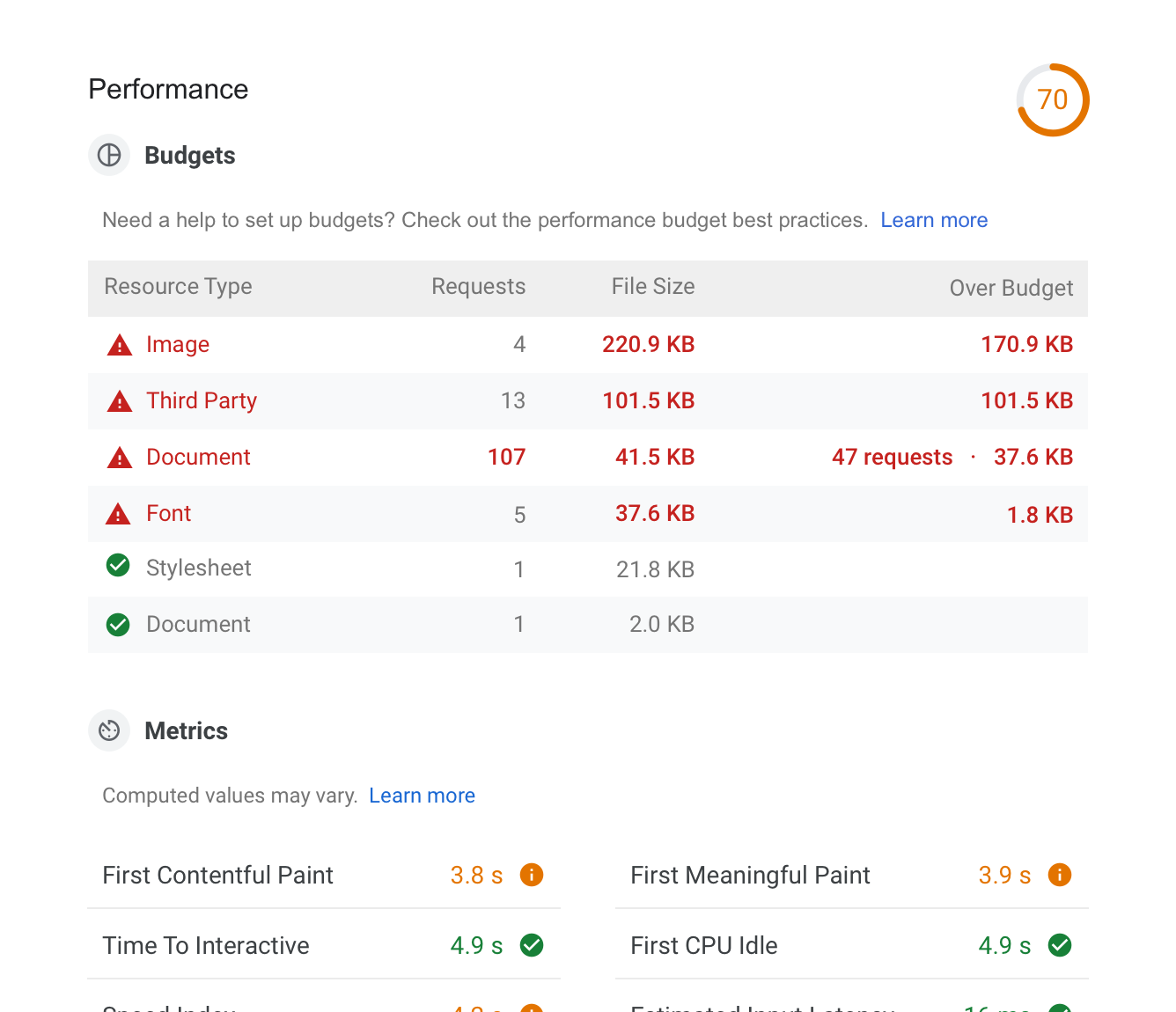
2. When budgets are set, add a special section 'Budgets' at the top

Looks like there's a consensus on this as well, yay yay.
Q: What might be useful to include in the description?
12 - when budgets set add budgets section

3. Explorations on ways to show problematics deltas (feel free to skip to 4. Recommendation)

Started with essential data points: What/how much exceeded(<-- more important), and What/how much saved (<-- less important than 'exceeded', but, still need to know what's remained).
And then tried additional visual charts to see if they contribute to removing any unclarity.

20

4. Recommendation

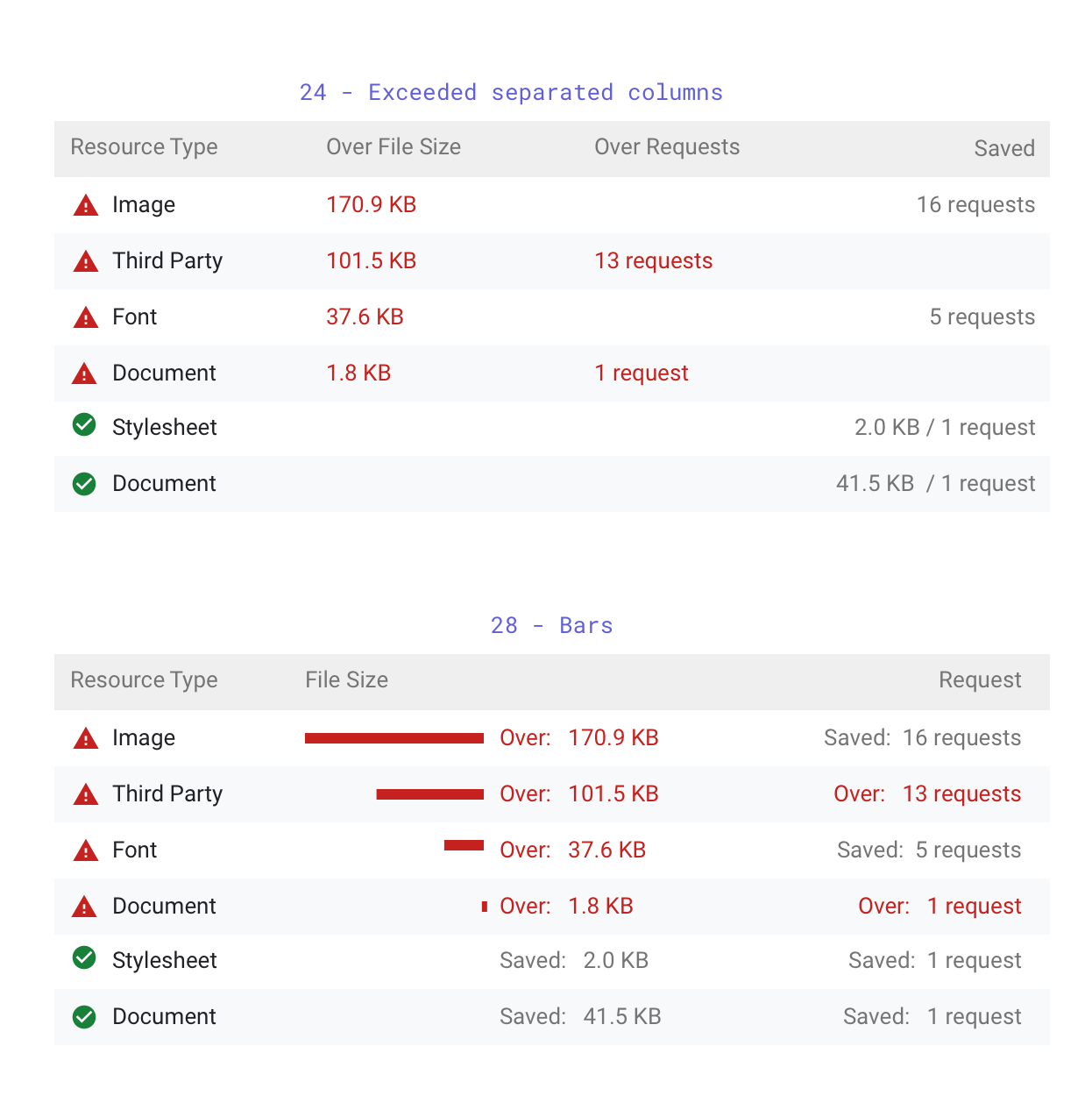
Narrowing down, picked options that have better clarity on what needs the user attention first. 24 seems to carry essential info with minimum elements. 28 adds more elements, but, also gets more visual emphasis on what failed. My recommendation is 24, simpler visuals.

30

Please share your views. Thanks team!

@hwikyounglee
Copy link

FYI - Sketch file
Lightwallet.zip

@hwikyounglee
Copy link

Feedback for next iteration:

  • Try combining filesize and requests on both diagnostics and budgets
  • Always show filesize and requests in the second column
  • Expand the visual treatments of mock 23
  • Color in gray if passing, and in read if exceeding
  • Use the column label 'Over budget'
  • Show the delta in red the over budget column, and leave it blank if passing (showing headroom can mislead)
  • '/' as a divider is confusing, try different treatments

@khempenius
Copy link
Collaborator Author

Proposal: Support page-specific performance budgets in LightWallet

Many people have commented elsewhere that they would like to be able to define page-specific performance budgets rather than being forced to use a single performance budget across their entire app.

This could work like this:

Specifying a URL

The url property will be mandatory for the Budget object. Its value should be a string that either represents a regular expression or the exact URL of a webpage.

{

  "budgets": [

    {

      "url": ".*", // perf budget that applies to all pages

      "pageWeight": [ ... ],

      "timings": [ ... ]

    },

    {

      "url": "https://pets.com/cats", // perf budget for a specific page

      "requests": [...]

    }

  ]

}

Note: Technically a URL can be a regex too - it just only matches one string. Thus, there is no need to determine whether a user supplied a regex or a url - they are the same thing in the end and are evaluated using the same logic.

new RegExp(".*").test("pets.com")
// true
new RegExp("awesome.com").test("pets.com")
// true

Regexes can be written in JSON like this: "ab+c" (equivalent to /ab+c/)

Regexes have native JavaScript support, so implementing this would not require adding dependencies.

Alternatives Considered:

  • No regex support: This would be slightly simpler to implement but it would also significantly decrease LightWallet's usefulness and flexibility.

Interactions between budgets

All matching Budgets will apply to a page. If these budgets conflict (e.g. the JavaScript budget is set to 100KB in one place and 200KB in another place), the last-listed budget will apply. This is straightforward to implement via Object.assign().

Alternatives Considered:

  • Error if budgets conflict: This would make it impossible to use the pattern of declaring a global budget then declaring overrides for specific pages.

@brendankenny
Copy link
Contributor

Alternatives Considered:
No regex support: This would be slightly simpler to implement but it would also significantly decrease LightWallet's usefulness and flexibility.

regexes can be a denial of service issue. We'll need to do some sanitizing anyway if we're downloading these files, but one possible alternative would be the robots.txt format. It's widely known and is still used after such a long time, so in theory it has some merit despite its limitations :)

@khempenius
Copy link
Collaborator Author

khempenius commented Mar 14, 2019

🤦‍♀️Duh. I forgot about this executing on our servers for PSI, which adds security concerns.

I like the idea of using the robots.txt format.

{
  "budgets": [
    {
      "path": "/",
      "pageWeight": [ ... ],
      "timings": [ ... ]
    },
    {
      "path": "/blog*",
      "pageWeight": [ ... ],
      "timings": [ ... ]
    }
  ]
}

Paths
Pages would be identified by paths rather than complete URLs. As a result, it could be difficult to use one budgets.json for two separate separate sites, but that seems like a reasonable tradeoff. The alternative would be to use robots.txt-style URLs, but that seems like that could potentially be confusing to users because it would be establishing a new LightWallet-specific convention.

Regular Expressions
robots.txt supports these two "regular expressions":

  • * designates 0 or more instances of any valid character.
  • $ designates the end of the URL.

I'd add the additional requirement that only one wildcard per URL will be allowed. This seems to match robots.txt convention (although I haven't been able to find a mention of this in the spec either way) and would simplify the logic required to implement this.

Further sanitization measures

  • Character whitelisting; reject (rather than sanitize) inputs that don't pass. Whitelist could be somewhatsimilar to this, but with * and $ whitelisted, protocol not included, etc.. Whitelisting would be much more restrictive but has the downside that non-western alphabet characters (amongst other things) could not be in budgets.json path strings.
  • Limit input length: Not sure if this would be superfluous, but it certainly wouldn't hurt.

@hwikyounglee
Copy link

hwikyounglee commented Mar 17, 2019

A revision to emphasize deltas & place totals closer. I like this direction. WDY-all-T?

01 Budget set
02 Diagnostics line item expanded

From last feedback (2019/03/12)

  • Try combining filesize and requests on both diagnostics and budgets <-- narrowed the distance
  • Always show filesize and requests in the second column <-- 2nd & 3rd columns
  • Expand the visual treatments of mock 23
  • Color in gray if passing, and in red if exceeding
  • Use the column label 'Over budget'
  • Show the delta in red the over budget column, and leave it blank if passing (showing headroom can mislead)
  • '/' as a divider is confusing, try different treatments

Lightwallet 2.zip

@csabapalfi
Copy link
Contributor

csabapalfi commented Mar 19, 2019

Hi,

Really excited about this! I have some feedback/ideas based on developing a similar custom audit a while back:

Third Party

  • not all sites have matching root domains for their CDN (e.g google.com, gstatic.com, ...)
  • Would it makse sense to allow specifying additional first-party domains? (in budgets.json)

Document

  • Some pages will request resources with Document content types (even some marketing tags do this)
  • Would it make sense to split out the Initial Document in it's own category? (as that would be more important)

Just realized that most of my feedback is about implementation and not just UX...

@addyosmani
Copy link
Member

addyosmani commented Apr 4, 2019

Hey folks. I believe we’re blocked on UI and the local story for budgets.json (after talking to @khempenius and @brendankenny) so wanted to see if we could pave a way forward here ▶️. This will allow us to update the PR in a timely manner :)

Local support

Solving support for LightWallet for the CLI use-case is the P0 because it unlocks use for folks that want to use this in CI (or in their local dev workflow). We’ve seen some early partners use this PR in this way (already, funnily enough).

Decisions to make:

  • Are we okay with shipping an MVP that supports passing in budgets.json to the core options? [We’re pretty OK if this is just supported via CLI short-term]
  • Where internal to Lighthouse will budgets need to be scored?
  • Where and in what shape should data live in the JSON report?
  • How should we pipe this through to the report renderer?

Mid-term (post I/O?), I’d love to figure out how we can add UI support for selecting a local budgets.json file (via LH/DevTools).

Given that we haven’t looped the DevTools team into this work yet, I’m unsure just how feasible that will be. We can look at this problem later on if we think it’ll require a lot of work. I don’t yet know if that would leverage DevTools Workspaces or if Lighthouse itself could let you select a file from the Audits panel. A non-CLI flow will unblock this feature to the masses.

Report redesign

Brendan shared that there’s a few changes to the report in the works: a UI redesign Hwi/Yuin are focused on, reporting diffing, LightWallet, and a few other bits that are resulting in some cyclical decisions we’re needing to make :) It’d be great if the redesign factored in budgeting. Is that currently the plan?

We probably need a product decision here.

If we want to ship LightWallet in the next month (...would love to do this for the MVP), I’m happy for us to commit to quickly rewriting how our implementation looks in the report if there are redesigns planned. We could probably tackle this as soon as needed after the work initially lands. I understand there are many parallel workstreams happening at the moment and wanted to acknowledge we need to make some decisions here.. :)

From Brendan’s description, it seems like the redesign can be done iteratively which will assist with changing reports out from under folks. As I don’t...think? the redesign of the report has strict timelines around it, we may be able to take our time on those changes rolling out? Given budgets are optional (at first) perhaps this makes them easier to ship even if we think the UI will need some decent iteration over time.

If there are rewrite changes that end up breaking LightWallet, we’re (Katie) okay with trying to keep up with this churn.

Does this sound reasonable? Are there aspects of moving forward that I’m not factoring in?

@hwikyounglee
Copy link

hwikyounglee commented Apr 4, 2019

Thanks Addy for outlining the suggestions. A few UX notes:

re: order between LW design and the new design
The proposed latest LW design can/should go first, IMO. The new design can wait post-LW launch as long as it makes sense to Paul and team.
P.S. LW uses the most of the existing UI/visual styles that, from my view, I don't see any significant issue in updating them to the new design later.

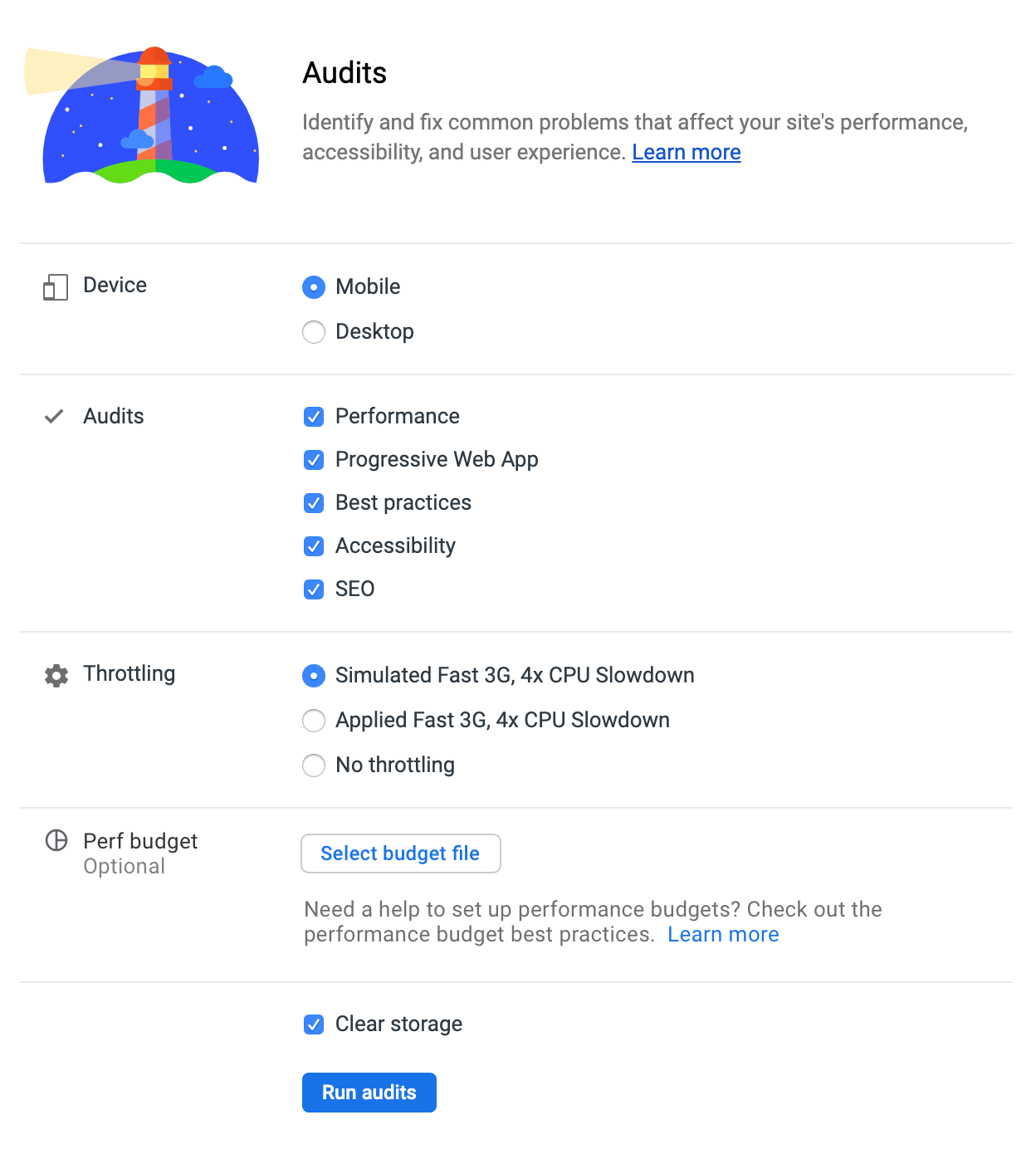
re: budget file upload UI
Does this sketch illustrate what we have in mind? Or something else?
config

@addyosmani
Copy link
Member

Thank you, Hwi. I'll await a call on next steps design wise from Paul, Elizabeth and team. Let's see what they think.

UI for Budget config selection: That's a perfect visualization of what I had in mind! :)

@brendankenny
Copy link
Contributor

Closing in favor of individual PRs :)

@verlok
Copy link

verlok commented Jul 12, 2019

Is lightwallet released today?
I can't find it googling for it

@evenstensberg
Copy link
Contributor

Sign up for free to join this conversation on GitHub. Already have an account? Sign in to comment

Labels

None yet

Projects

None yet

Development

Successfully merging this pull request may close these issues.