Refactoring DataGridAssist input handling #2824
Merged
Conversation
This file contains hidden or bidirectional Unicode text that may be interpreted or compiled differently than what appears below. To review, open the file in an editor that reveals hidden Unicode characters.
Learn more about bidirectional Unicode characters


Member
|
Ok I'll check it tomorrow |

ElieTaillard
approved these changes
Aug 25, 2022
ElieTaillard
approved these changes
Aug 25, 2022
Member
 ElieTaillard
left a comment
ElieTaillard
left a comment
ElieTaillard
left a comment
There was a problem hiding this comment.
I just tested it and it works perfectly. I don't notice any strange behavior anymore. There is only the pop up that does not open at the right place in my case.
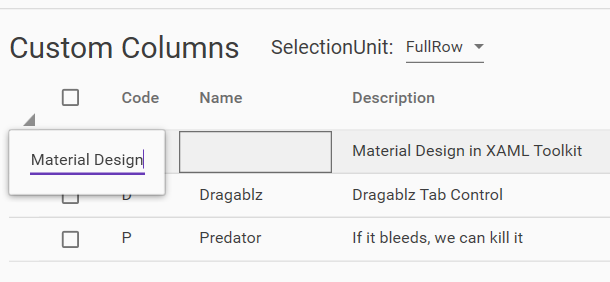
Good job anyway!

Contributor
Author
@Xaalek Does it work the way you would expect? |
Member
|
@nicolaihenriksen Yeah, perfect. Just the pop up thing is weird but that's another issue. |
 nicolaihenriksen
changed the title
nicolaihenriksen
changed the title


Rather than handling the tunneling event and "pre-processing", it now handles the (already handled - by the cell) bubbling event to perform additional actions.
Fixed issue where it would not switch to edit on click
 Keboo
force-pushed
the
modifiedDataGridClickHandling
branch
from
Keboo
force-pushed
the
modifiedDataGridClickHandling
branch
from
f860959 to
0fc5635
Compare

Keboo
approved these changes
Aug 30, 2022
Keboo
added a commit
that referenced
this pull request
Sep 9, 2022


…#2828)

* Initial PasswordBox "revealed" styles

There are still issues with the positioning of the floating hint when password is revealed but empty; the hint should float up, but it does not.

* Fixed alignment and initial wiring up

Floating hint still misplaced when password is empty and revealed

* Showcasing style in sample app + alignment of reveal button

Reveal button aligns with the "clear text" button for consistency. Although I think the "clear text" button is floating a little too high in 2 of the styles (but that is the same for the normal PasswordBox and TextBox styles)

* Showcase that password can still be set from XAML

* Change PasswordChanged event handler to weak event pattern

Avoid leaking memory by replacing the regular event handler with a weak event handler.

* Updated showcasing in the demo tool with a bit more stuff

* Fixed CA warning

* Added UI test for 3-way binding

* [Icon update detected by Github Action]. Auto generated pull request. (#2830)

Co-authored-by: Material Design Service Account <[email protected]>

* Cursor fix (#2832)

Respects a cursor set from outside, otherwise falls back to the desired defaults

* Fixed embedded dialog host style (#2826) (#2829)

Using materialDesign:TransitionAssist.DisableTransitions="true" duration of animation for content cover opacity should be set to 0 to skip animations at all on close dialog host

* Fix for 2596 - Align left margin for error message on outlined TextBox with helper text left margin (#2820)

* Fix left margin for error message on outlined TextBox

The error message and helper text should have the same Margin.Left value for the outlined TextBox.

* Adjusted error text left margin for filled text fields

ComboBoxes, DatePicker and TimePicker all rely on the fields internally, and thus inherit these changes.

* Added UI test for the filled style as well

* Retain original bottom margin

I want to make as few changes as possible to the original style (margin)

* Let DataGridCell handle mouse events itself when already editing (#2821)

* Refactoring DataGridAssist input handling (#2824)

* Refactoring DataGridAssist mouse handling

Rather than handling the tunneling event and "pre-processing", it now handles the (already handled - by the cell) bubbling event to perform additional actions.

* Added template column example

Fixed issue where it would not switch to edit on click

Co-authored-by: Kevin Bost <[email protected]>

* Initial PasswordBox "revealed" styles

There are still issues with the positioning of the floating hint when password is revealed but empty; the hint should float up, but it does not.

* Fixed alignment and initial wiring up

Floating hint still misplaced when password is empty and revealed

* Showcasing style in sample app + alignment of reveal button

Reveal button aligns with the "clear text" button for consistency. Although I think the "clear text" button is floating a little too high in 2 of the styles (but that is the same for the normal PasswordBox and TextBox styles)

* Showcase that password can still be set from XAML

* Change PasswordChanged event handler to weak event pattern

Avoid leaking memory by replacing the regular event handler with a weak event handler.

* Updated showcasing in the demo tool with a bit more stuff

* Fixed CA warning

* Added UI test for 3-way binding

* Resolving merge conflicts

* Resolving merge conflicts

* Fixing hint proxy issues with password box

* Moved samples and added SMTX wrapper

Also fixed a bug regarding the opacity of the PART_ClearButton which was not consistent across the styles.

* Apply cursor fix

Co-authored-by: github-actions[bot] <41898282+github-actions[bot]@users.noreply.github.com>
Co-authored-by: Material Design Service Account <[email protected]>
Co-authored-by: Andrey Nasonov <[email protected]>
Co-authored-by: Kevin Bost <[email protected]>

Sign up for free
to join this conversation on GitHub.
Already have an account?
Sign in to comment
3 participants


Add this suggestion to a batch that can be applied as a single commit.
This suggestion is invalid because no changes were made to the code.
Suggestions cannot be applied while the pull request is closed.
Suggestions cannot be applied while viewing a subset of changes.
Only one suggestion per line can be applied in a batch.
Add this suggestion to a batch that can be applied as a single commit.
Applying suggestions on deleted lines is not supported.
You must change the existing code in this line in order to create a valid suggestion.
Outdated suggestions cannot be applied.
This suggestion has been applied or marked resolved.
Suggestions cannot be applied from pending reviews.
Suggestions cannot be applied on multi-line comments.
Suggestions cannot be applied while the pull request is queued to merge.
Suggestion cannot be applied right now. Please check back later.
While working on #2821 @Xaalek indicated that the mouse handling was a bit strange. Indeed it was/is.
This PR refactors the mouse handling (and keyboard handling) of the DataGridAssist to try to sort out the strange behavior.
The key changes are that DataGridAssist:
PreviewMouseLeftButtonDownevent, but rather handles the bubbling eventMouseLeftButtonDown. This event is already handled by the cell, soUIElement.AddHandler()is needed in order for the delegate to be invoked on already handled events (the last bool parameter of the method signature). This sort of flips the problem "upside down", but it seems more natural to do it this way; in the existing code we're raising bubbling events of the same type (mouse left button down) from inside a tunneling event, that just seems wrong to me.KeyDownevent, but rather handles the tunnelingPreviewKeyDownevent. This is merely used to start editing a cell, and thus the cell itself does not need to process the key event first. I was a little worried this might kill the use of spacebar inside of aTextBoxedit control, but it does not (probably because thee.OriginalSourceis not aDataGridCellin that scenario).I suggest you checkout the branch and play around with it. Based on the history of the
DataGridAssisttype I could see that there previously was some issues with correctly displaying/highlighting the selected cell/row depending on theDataGrid.SelectionUnitproperty, so I added options to change that from the UI of the demo tool and also ensured that things work the way I think the user would expect it to.There is a slight "funkyness" to the behavior that we start editing on single-click. This means that once editing is started and you press Tab to jump between the cells, the next cell also enters edit mode. However, you can use ESC to exit edit mode, and then you can use Tab to simply jump between the cells without activating edit mode. It is quite obvious why it works that way seen from the code, I am just wondering about the UX perspectives of those two different experiences using the Tab key.
Give it a spin and let me know what you think.