Fix Nuget Solution Package manager UI is slow because restore is run for every project instead of after all projects are updated #3559
Conversation


 erdembayar
requested review from
aortiz-msft,
cristinamanum,
dominoFire,
donnie-msft,
dtivel,
heng-liu,
kartheekp-ms,
nkolev92 and
rrelyea
as code owners
erdembayar
requested review from
aortiz-msft,
cristinamanum,
dominoFire,
donnie-msft,
dtivel,
heng-liu,
kartheekp-ms,
nkolev92 and
rrelyea
as code owners

 cristinamanum
left a comment
cristinamanum
left a comment
cristinamanum
left a comment
There was a problem hiding this comment.
In the PR description there is the comment that without the changes there were unnecessary restores performed. What was the root cause of the unnecessary Restores and part part of the changes fixed this?
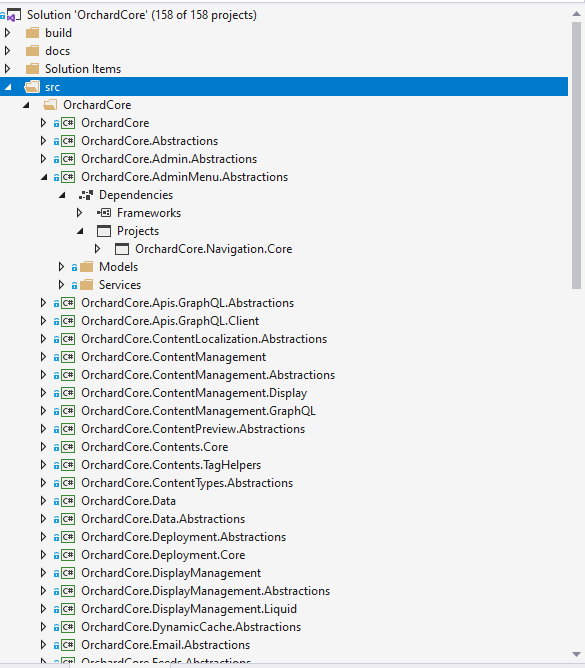
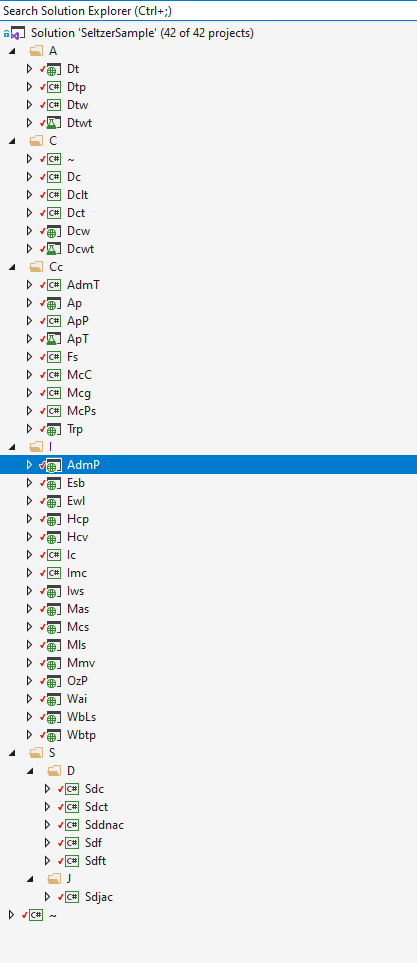
How large (as count of projects) was the test solution used for benchmarks. Did it have Project to Project references?
Problem was previously: Yes, I tested it customer provided large solution and OrchardCore which has 158 projects in it. I believe OrchardCore is Project to Project reference type.
|

test/TestUtilities/Test.Utility/ProjectManagement/TestNuGetProjectContext.cs
Outdated
Show resolved
Hide resolved

 nkolev92
left a comment
nkolev92
left a comment
nkolev92
left a comment
There was a problem hiding this comment.
One concern left for this PR.
There's follow ups for the rest.
test/NuGet.Core.Tests/NuGet.Commands.Test/RestoreCommandTests.cs
Outdated
Show resolved
Hide resolved
| dgSpec = dgSpec.WithPackageSpecs(newNugetPackageSpecs); | ||
|
|
||
| // Assert | ||
| Assert.Equal(dgSpec.Projects.Count, 3); |
There was a problem hiding this comment.
The way it's currently implemented, does it do anything?
It's expected that the project we are modifying already exists, so calling AddProject won't replace it.

I know I'm being pedantic here, but I do think it's very important.
So what we really do is:
|
…ryProjectInsteadofAllProjectsAreUpdated
Merge to |
Yes, it's more up to date info. It evolved as I tried to solve it. |

 zivkan
left a comment
zivkan
left a comment
zivkan
left a comment
There was a problem hiding this comment.
I only reviewed code quality and gave comments on my wish-list. Since everything I suggested are changing patterns used extensively thoughout NuGet.Client, I have no right to block the PR over these wishes, but I do wish that we stopped doing what I personally consider anti-patterns. The business-logic was too hard for me to review, so I'm trusting others and your own testing.
| throw new ArgumentNullException(nameof(activeSources)); | ||
| } | ||
|
|
||
| if (!activeSources.Any()) |
There was a problem hiding this comment.
multiple enumerations are a pet-peeve of mine, because before joining Microsoft, I worked on a product with a database backend that would throw expections when when this was done. But even when the input parameter comes from an in-memory collection, if it itself is a LINQ query, for example someList.Where(x => ExpensiveCheck(x)), then the ExpensiveCheck will be called on each item in someList, every time that the IEnumerable is enumerated.
If the count of items in the enumerable is desirable, I would prefer if you changed the parameter's type to IReadOnlyCollection<T>, so you can use .Count == 0 instead of !x.Any(), and therefore avoid enumerating the IEnumerable<T> multiple times.
Unfortunately NuGet.Client is full of this, which drives me crazy 😢
Unless it affects a shipped public API, then we shouldn't do it, but we should design new public APIs to be better.
There was a problem hiding this comment.
Ok. I'll remember it for my next PRs. Since it was existing pattern I just copied without much thinking.
You're right about this. I changed to IReadOnlyCollection, so I started use .Count == 0 instead of !x.Any().
| } | ||
| } | ||
|
|
||
| if (buildIntegratedProjectsToUpdate.Any()) |
There was a problem hiding this comment.
Considering buildIntegratedProjectsToUpdate has type List<T>, using LINQ's .Any() is just a low-performance way of doing .Count > 0. I suggest the high performance check instead.

There was a problem hiding this comment.
I would have to step into .Any to verify it, but I believe that it should be optimized to be equivalent to .Count > 0...
There was a problem hiding this comment.
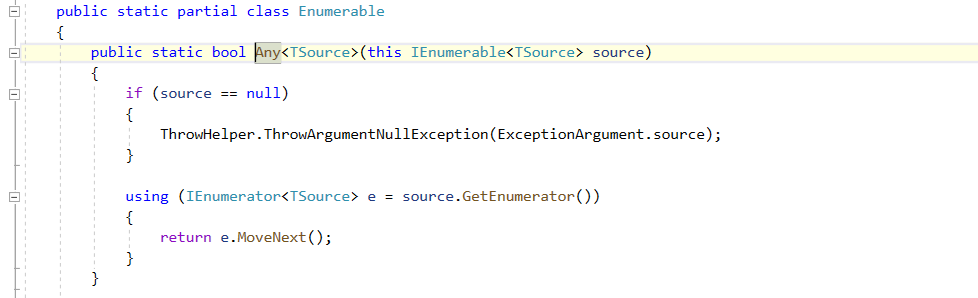
@srdjanjovcic here is decompiled code for Any().
There was a problem hiding this comment.
Which one is it extracted from? Dot net source browser says there are special cases for ICollection<>:
https://source.dot.net/#System.Linq/System/Linq/AnyAll.cs,8788153112b7ffd0
There was a problem hiding this comment.
typecasting (if (value is ICollection)) has a cost which is simply not needed if you use .Count > 1 instead. I'm not saying it's a huge perf gain, but it doesn't require any kind of refactoring, and therefore doesn't meet the criteria for the famous "premature optimization is the root of all evil" justifaction.
There was a problem hiding this comment.
FWIW, I just ran a little benchmark with BenchmarkDotNet comparing return x.Any() vs return x.Count > 0.
|  Method |           Job |       Runtime |       Mean |     Error |    StdDev |     Median |  Ratio | RatioSD |
|-------- |-------------- |-------------- |-----------:|----------:|----------:|-----------:|-------:|--------:|
| LinqAny |    .NET 4.7.2 |    .NET 4.7.2 | 21.9659 ns | 0.0822 ns | 0.0769 ns | 21.9814 ns |      ? |       ? |
|   Count |    .NET 4.7.2 |    .NET 4.7.2 |  0.0000 ns | 0.0000 ns | 0.0000 ns |  0.0000 ns |      ? |       ? |
|         |               |               |            |           |           |            |        |         |
| LinqAny | .NET Core 2.1 | .NET Core 2.1 | 20.4153 ns | 0.0645 ns | 0.0603 ns | 20.3939 ns |      ? |       ? |
|   Count | .NET Core 2.1 | .NET Core 2.1 |  0.0102 ns | 0.0169 ns | 0.0141 ns |  0.0026 ns |      ? |       ? |
|         |               |               |            |           |           |            |        |         |
| LinqAny | .NET Core 3.1 | .NET Core 3.1 | 16.5302 ns | 0.3592 ns | 0.7418 ns | 16.5427 ns | 401.23 |  114.15 |
|   Count | .NET Core 3.1 | .NET Core 3.1 |  0.0454 ns | 0.0179 ns | 0.0150 ns |  0.0455 ns |   1.00 |    0.00 |
|         |               |               |            |           |           |            |        |         |
| LinqAny | .NET Core 5.0 | .NET Core 5.0 |  4.0125 ns | 0.0253 ns | 0.0237 ns |  4.0006 ns |      ? |       ? |
|   Count | .NET Core 5.0 | .NET Core 5.0 |  0.0000 ns | 0.0000 ns | 0.0000 ns |  0.0000 ns |      ? |       ? |

// * Warnings *
BaselineCustomAnalyzer
  Summary -> A question mark '?' symbol indicates that it was not possible to compute the (Ratio, RatioSD) column(s) because the baseline value is too close to zero.
ZeroMeasurement
  Program.Count: .NET 4.7.2    -> The method duration is indistinguishable from the empty method duration
  Program.Count: .NET Core 2.1 -> The method duration is indistinguishable from the empty method duration
  Program.Count: .NET Core 5.0 -> The method duration is indistinguishable from the empty method duration
.Any() may only take nanoseconds, but you can still see how much slower it is than .Count > 0. Multiple these nano-second time wastage by the hundreds or thousands of times this anti-pattern is used thoughout a codebase, and you can end up with multi-second delays. Since .Any() takes much, much less than 1ms, a performance trace is unlikely to capture it in a stack trace, so might not even tell you about this poor performance practice.
There was a problem hiding this comment.
Ok. Taken the suggestion.
There was a problem hiding this comment.
I would do search'n'replace on all .Any() calls throughout codebase, then just undo those which do not work (on IEnumerable<>, for example). 🙂
There was a problem hiding this comment.
...as a separate PR, off course.
| var resolvedActions = await PreviewBuildIntegratedProjectsActionsAsync( | ||
| buildIntegratedProjectsToUpdate, | ||
| nugetProjectActionsLookup: null, // no nugetProjectActionsLookup so it'll be derived from packageIdentity and activeSources | ||
| packageIdentity, | ||
| activeSources, | ||
| nuGetProjectContext, | ||
| token | ||
| ); |
There was a problem hiding this comment.
I'm surprised that dotnet-format didn't complain about this formatting. Usually when long statements get split into multiple lines, particularlly method calls, the second line oneward is indented compared to the first line. Additionally, the ); is normally on the same line as the last parameter.
There was a problem hiding this comment.
Ok. dotnet format didn't complain about it.
I just fixed it.
| } | ||
|
|
||
| if (File.Exists(lockFilePath)) | ||
| if (!buildIntegratedProjects.Any()) |
There was a problem hiding this comment.
Like my previous comment, this is causing multiple enumerations of a type defined as IEnumerable. NuGet does it a lot, but I really wish it didn't. If possible, I think it would be great to either change the parameter type, or change the code so it doesn't.
There was a problem hiding this comment.
Changed to IReadOnlyCollection and Count. Fixed.
| PackageSpecOperations.RemoveDependency(updatedPackageSpec, action.PackageIdentity.Id); | ||
| if (!nugetProjectActionsLookup.ContainsKey(buildIntegratedProject.MSBuildProjectPath)) | ||
| { | ||
| throw new ArgumentNullException($"Either should have value in {nameof(nugetProjectActionsLookup)} for {buildIntegratedProject.MSBuildProjectPath} or {nameof(packageIdentity)} & {nameof(primarySources)}"); |
There was a problem hiding this comment.
@nkolev92 should NuGet SDK exception messages be localized? I could believe that NuGet.Client doesn't have any code-path that hits this exception, but since it's a NuGet SDK project, customers might call it when the locale isn't English.
| var nuGetProjectActions = nugetProjectActionsLookup[buildIntegratedProject.MSBuildProjectPath]; | ||
| var nuGetProjectActionsList = nuGetProjectActions.ToList(); |
There was a problem hiding this comment.
I think this is the same dictionary as I commented on above, but just in case it's not, can we change the dictionary's value type, so we don't have to run .ToList() and do extra memory allocations?
There was a problem hiding this comment.
Ok. Taken the suggestion.
| var lockFileLookup = new Dictionary<string, LockFile>(PathUtility.GetStringComparerBasedOnOS()); | ||
| var dependencyGraphContext = new DependencyGraphCacheContext(logger, Settings); | ||
| var pathContext = NuGetPathContext.Create(Settings); | ||
| var providerCache = new RestoreCommandProvidersCache(); | ||
| var updatedNugetPackageSpecLookup = new Dictionary<string, PackageSpec>(PathUtility.GetStringComparerBasedOnOS()); | ||
| var originalNugetPackageSpecLookup = new Dictionary<string, PackageSpec>(PathUtility.GetStringComparerBasedOnOS()); | ||
| var nuGetProjectSourceLookup = new Dictionary<string, HashSet<SourceRepository>>(PathUtility.GetStringComparerBasedOnOS()); |
There was a problem hiding this comment.
Rather than having 4 dictionaries that I think all use the same key (project), can we create a private class that has 4 fields/properties, and just one dictionary? From a perf point of view, it reduces allocations, in addition to only needing a single lookup for read, and if implemented well, a single lookup per project when setting the value.
There was a problem hiding this comment.
Maybe keep it for now. It's not repeated loop thing, gain will be negligible. I'll keep in mind next time
| public class DependencyGraphSpecTests | ||
| { | ||
| [Fact] | ||
| public void DependencyGraphSpecTests_WithPackageSpecs() |
There was a problem hiding this comment.
There's no benefit to prefixing the test method name with the name of the class. I don't know if we have it documented, but we're commonly using the pattern "methodBeingTested_Scenario_ExpectedResult". So, something like WithPackagesSpecs_GivenTwoPackageSpecs_ContainsTwo
|
|
||
| namespace NuGet.Test | ||
| { | ||
| public class DependencyGraphSpecTests |
There was a problem hiding this comment.
WithPackageSpecs is supposed to have the same behavior as calling WithReplacedSpec multiple time, right? Maybe it's worth having a test that validates that.
There was a problem hiding this comment.
They're little bit different. WithReplacedSpec keeps only last 1 restore command and all projects. But WithPackageSpecs has more than 1 restore.
| @@ -447,6 +456,1817 @@ public async Task GetInstalledVersion_WithAssetsFile_ChangingPackageSpec_Returns | |||
| } | |||
| } | |||
|
|
|||
| [Fact] | |||
There was a problem hiding this comment.
I don't know if you can do anything about this, NuGet.Client doesn't have good test infrastructure, or well designed classes for testing, in my opinion. But I just compared the first 2 tests, they're 149 and 131 lines long respectively, and contain less than 20 differences. This file has nearly 2000 new lines in 13 tests. I don't know how I'm supposed to review them.
There was a problem hiding this comment.
Currently I still don't know all the details of unit test tool here like SimpleTestPackageContext , SimpleTestPackageUtility etc.
I just saw previous unit test and tried to adapt to my need. I know there're repeated code, but they're not exactly same. Maybe next time I'll create something better than this. Some of unit tests tested here is maybe not important, I just tried to test all the possible complex cases. Since I tried to create more complex cases it has few lines different at beginning or middle/end. But I believe tools for creating good test infrastructure would be separate efford.
There was a problem hiding this comment.
Also I more thought is I have fix for NuGet/Home#9224 here too.
Most unit tests are for that one check for correctness, not for performance improvement.
I wish I created 2 separated PRs then things would be better.

| Assert.Equal(initialInstalledPackages.Count(), 2); | ||
| var builtIntegratedActions = actions.OfType<BuildIntegratedProjectAction>().ToList(); | ||
| Assert.Equal(actions.Count(), targetProjects.Count()); | ||
| Assert.Equal(actions.Count(), builtIntegratedActions.Count()); | ||
| // Upgrade succeed for this middle parent project(with parent and childs). |

There was a problem hiding this comment.
I see so many references to .Count() extension method which is O(n) time complexity. Use .Count instead.
There was a problem hiding this comment.
On some .NET runtimes, LINQ's .Count() tries to typecast to ICollection and then call .Count, so it's not O(n). But, it's just like this other comment thread: #3559 (comment)
Basically, we should all be trying to avoid LINQ where possible. Use it when it increases readability, but be aware that it always has a performance cost. Even using foreach has a perf cost compared to a for loop, but the perf difference I think is smaller than avoiding LINQ.
There was a problem hiding this comment.
I think calling just once for initialInstalledPackages.Count() is ok, because we're evaluating only 1 time. If we convert to List/Array then by the time we call .ToList()/ToArray() it'll cost too.
But for repeated use of .Count() or .Any() on same IEnumerable item will of course adds up.
nkolev92
left a comment
nkolev92
left a comment
There was a problem hiding this comment.
LGTM!
👏 👏 👏 👏 👏
This was a very involved change, but it should bring us some pretty amazing improvements!
…ryProjectInsteadofAllProjectsAreUpdated
erdembayar
deleted the
dev-eryondon-PMUIslowBecauseRestorerunsforEveryProjectInsteadofAllProjectsAreUpdated
branch

…for every project instead of after all projects are updated (#3559)

* Added relationship table to hold ancesstors and descendents relationship for target projects.

* Now 1065 is solved because we pass correct update PackageSpec of child before parent restores.

* Remove RelationshipTree for now.

* Add unshipped public api.

* Remove unused item and add initial value to dictionary to prevent from null exception.

* More streamline package reference type code restore.

* Revert "More streamline package reference type code restore."

This reverts commit 875968b.

* Restore NugetBuiltIntegrated restore works only in 1 pass.

* Minor refactoring for naming.

* Explicit clearing of cache.

* Initial refactoring of moving caching of updated PackageSpec near to usage, make it run parellel not finished yet.

* Made BuiltIntegratedProject project upgrade/downgrade parallel run for faster run.

* Fix minor typos.

* Remove unused methods and variables.

* Remove more unused item.

* Revert "Remove more unused item."

This reverts commit efa1782.

* Patching in memory works.

* Cleanup

* Minor text change

* More code cleanup.

* Rename PreviewBuildIntegratedProjectActionsParallelAsync method to PreviewBuildIntegratedProjectsActionsAsync

* Add unit tests for covering PreviewBuildIntegratedProjectsActionsAsync method in NuGetPackageManager.

* Add more unit tests for BuildIntegratedTests

* Address Andy's code review comment.

* Add unit test for DependencyGraphSpec>>WithReplacedPackageSpecs new method I created.

* Get Andy's advise for reduce runtime time complexity.

* Change package versions because it's failing on .NetCore unit tests.

* Check if Newtonsoft version matches.

* Try different pacakge for unit test.

* Test

* Address comment about foreach loop variable name.

* Remove 'parallel' word from comment. Because actual parallel code is called thown the line different method.

* PackageReference/SDK style unit tests start working.

* Making source works for unit tests.

* Fixed problem of Unit test project not picking up my custom PackageSource.

* Revert LegacyPackageReferenceProject related changes, maybe I don't need it for now.

* Git clean up and fix added unit tests with new PackSource logic.

* Fix typo.

* Add NU1065 and new PackageSource handling to some unit test I forgot to add.

* Fix formatting recommendation in code review.

* Remove parallel wording from method comment, because actual parallelization happend down the line another called method here.

* Fix typo.

* Refactor code after Andy's code review.
thinking about API design:

	Why does this method only accept BuildIntegratedNuGetProject?
	Why can't this method be made internal, and the existing public API PreviewInstallPackageAsync calls it for compatible project types?

* Fix small typo.

* After refactoring code PreviewBuildIntegratedProjectActionsAsync and PreviewBuildIntegratedProjectActionsAsync share same logic via PreviewBuildIntegratedProjectsActionsAsync
method.

* All PreviewProjectsInstallPackageAsync related unit test for NugetPackageManager are ported to NetCorePackageReferenceProject(reference) type unit test from project json type unit tests.

* Remove the spaces and correct comments.

* Revert changes to BuildIntegratedTests.cs since we already ported all new unit tests to NetCorePackageReferenceProjectTests.cs

* Fix typo.

* Revert changes to LegacyPackageReferenceProjectTests.cs

* Revert back unneeded changes to NuGetPackageManagerTests.cs

* Remove unneeded change.

* Add missing copy right notice for new file GetPackageReferenceUtility.cs

* Add missing copyright notice for ProjectInstalledPackages.cs

* Remove wrong file.

* Revert unneeded changes.

* Fix typos.

* Address code review comments and clean up.

* Now also remembers we evaluated the parents too.

* Rename method name after nkolve92 code review.

* Address Nikolche code review comment about parent projects.

* Remove method PreviewResolveActionsForBuildIntegratedProjectsAsync method since it's so simple.

* Make sure restore happens only once during uninstall process for chain referenced projects.  Address: NuGet/Home#9932 (comment)

* Changed install package to all projects that it check for restore only happens once per project.

* Clean up unused items.

* Replace StringComparer.OrdinalIgnoreCase with PathUtility.GetStringComparerBasedOnOS() for other OS compatibility.

* Refactor the unit tests after Nikolche's code review.

* Change unit test names.

* Fix formatting.

* Fix with dot net formatting.

* Add comment why we're separating BuildIntegratedNuGetProject vs packages.config projects.

* Address more code review comments by Cristina.

* Address Svet's code review comment.

* Fix formatting.

* Address Andy's latest code review.

* Refactor unit test after Andy's code review.

* Fix unit test after Nikolche review.

* Fix formatting.

Co-authored-by: Erick Yondon <[email protected]>


Bug
Fixes: Nuget/Home#6010
Regression: No
Fix
Details:
Currently Nuget PackageReference type project are still very slow and customers reported same project restored several times over and over again, which not only slows also causes many repeated n^2 network calls.
So need of smarter/streamlined restore process which only restore
nprojects in O(n) runtime which means we restore each project only once.Runtime analysis: This is best we can achieve, we can't go better than this because each project from input need to be evaluated at least once. We're also doing all in memory evaluation in parallel for more performance gain.
This change decreased runtime by %50 for large test project one of user contributed to us.
OrchardCore (158 projects) upgrade package is now 34 sec
Before it was between : 1min 4 sec to 7 min 12 sec. This big variation happen due to ordering which projects are evaluated because of same project restored several times, but now it's more consistent because restore happen just once per project.
So improvement for upgrade/downgrade is between about 2- 14 times faster, which is great and more sub-optimization are coming soon.
This PR contains commits for fixing #9224 downgrade error(NU1605) problems too. Please check it this PR#3553 for description.
PM UI upgrade/downgrade actions:

Before improvement verbose downgrade log:
https://gist.github.com/erdembayar/06574b16e8395f2fcd308df480d5dc55
In above log you'll find
Restoring packages for C:\Users\eryondon\Downloads\nuget-sample-master\nuget-sample-master\A\Dtwt\Dtwt.csproj...2 times, that meansDtwt.csprojproject was restored 2 times.Before improvement verbose upgrade log:
https://gist.github.com/erdembayar/b8b465842e164603a12fb20a9df6e3b7
In above log you'll find
Restoring packages for C:\Users\eryondon\Downloads\nuget-sample-master\nuget-sample-master\A\Dtwt\Dtwt.csproj...2 times, that meansDtwt.csprojproject was restored 2 times.After improvement verbose downgrade log:
https://gist.github.com/erdembayar/286bc50683668656467c3f12ff3f5481
But now you'll see
Dtwt.csprojproject was restored 1 only time.After improvement verbose upgrade log:
https://gist.github.com/erdembayar/00f881be9f421479e1fdb59e323105cd
But now you'll see
Dtwt.csprojproject was restored 1 only time.PM UI update action:

Before improvement verbose upgrade log:
https://gist.github.com/erdembayar/31badeb81717955048c57ca42e08e7cb
ConsoleApp1.csproj... was restored 2 times.
After improvement verbose upgrade log:
https://gist.github.com/erdembayar/ee05724bd7a5281408014f641e93760e
ConsoleApp1.csproj... was restored only 1 time.
PM Consolidate:

After improvement verbose upgrade log:
https://gist.github.com/erdembayar/62f3b7c6210abd1f00eac9884609d9a8
ConsoleApp1.csproj... was restored only 1 time.
PM UI
uninstallis now 2 times faster forOrchardCoresolutionBefore https://gist.github.com/erdembayar/2ba554f169e4f078baa61976affa62d4
2 min 1 seconds.After https://gist.github.com/erdembayar/2f9aebfbdc78e31d229a03223c8b1888
58 seconds.Note: Before
Preview build integrated action timetelemetry event was emitted for each individual project restore evaluation, but now it's emitted once for whole solution or several projects. So you might see less number of this events but might see some of them is much longer duration than previously. It might skew your averages if anyone use for any purpose I am not aware of it.Testing/Validation
Tests Added: Yes
I added several unit test for install/upgrade/downgrade cases:
For example here I make sure restore happens only once per project NetCorePackageReferenceProjectTests#L719:
I added 2 unit tests for this uninstall case:
NetCorePackageReferenceProjectTests#L2156
NetCorePackageReferenceProjectTests#L2325
Reason for not adding tests: N/A
Validation: Unit tests and Manual testing