Skip to content

Conversation

@erdembayar
Copy link
Contributor

Related to: NuGet/NuGet.Client#4855
Add new --format option for dotnet list package command. NuGet change was inserted to sdk here: #28913

Copy link
Member

@baronfel baronfel left a comment

Choose a reason for hiding this comment

The reason will be displayed to describe this comment to others. Learn more.

A few notes around how we could leverage System.CommandLine features to have a more consistent experience with the rest of the .NET CLI.

@erdembayar erdembayar force-pushed the dev-eryondon-add-dotnetlistpackage-formatoption2 branch from 9811a04 to c4c98a3 Compare November 16, 2022 05:31
@erdembayar erdembayar requested a review from baronfel November 16, 2022 14:50
@erdembayar
Copy link
Contributor Author

@baronfel
I addressed the PR comments, please review again.

@baronfel
Copy link
Member

I built and ran this PR to get a sense of the help output:

D:///////dotnet on  dev-eryondon-add-dotnetlistpackage-formatoption2 ≡  2
08:54:21 ❯ .\dotnet.exe list package --help
Description:
  List all package references of the project or solution.

Usage:
  dotnet list [<PROJECT | SOLUTION>] package [options]

Arguments:
  <PROJECT | SOLUTION>  The project or solution file to operate on. If a file is not specified, the command will search the current directory for one. [default:
                        D:\Code\dotnet-sdk\artifacts\bin\redist\Debug\dotnet\]

Options:
  -v, --verbosity <LEVEL>                  Set the MSBuild verbosity level. Allowed values are q[uiet], m[inimal], n[ormal], d[etailed], and diag[nostic].
  --outdated                               Lists packages that have newer versions. Cannot be combined with '--deprecated' or '--vulnerable' options.
  --deprecated                             Lists packages that have been deprecated. Cannot be combined with '--vulnerable' or '--outdated' options.
  --vulnerable                             Lists packages that have known vulnerabilities. Cannot be combined with '--deprecated' or '--outdated' options.
  --framework <FRAMEWORK | FRAMEWORK\RID>  Chooses a framework to show its packages. Use the option multiple times for multiple frameworks.
  --include-transitive                     Lists transitive and top-level packages.
  --include-prerelease                     Consider packages with prerelease versions when searching for newer packages. Requires the '--outdated' option.
  --highest-patch                          Consider only the packages with a matching major and minor version numbers when searching for newer packages. Requires the '--outdated' option.
  --highest-minor                          Consider only the packages with a matching major version number when searching for newer packages. Requires the '--outdated' option.
  --config <CONFIG_FILE>                   The path to the NuGet config file to use. Requires the '--outdated', '--deprecated' or '--vulnerable' option.
  --source <SOURCE>                        The NuGet sources to use when searching for newer packages. Requires the '--outdated', '--deprecated' or '--vulnerable' option.
  --interactive                            Allows the command to stop and wait for user input or action (for example to complete authentication).
  --format <FORMAT>                        Specifies the output format type for the list packages command.
  -?, -h, --help                           Show command line help.

I noticed that the valid choices for the output format weren't shown - instead the FORMAT text was. I tested and if you remove the use of ArgumentHelpName on the option definition, then System.CommandLine will do what I was hoping to see, which is this:

D:///////dotnet on  dev-eryondon-add-dotnetlistpackage-formatoption2 ≡  ~1  2
09:03:31 ❯ .\dotnet.exe list package --help
Description:
  List all package references of the project or solution.                                                                                                                                                                                                                                                                                                                             Usage:
  dotnet list [<PROJECT | SOLUTION>] package [options]

Arguments:
  <PROJECT | SOLUTION>  The project or solution file to operate on. If a file is not specified, the command will search the current directory for one. [default:
                        D:\Code\dotnet-sdk\artifacts\bin\redist\Debug\dotnet\]

Options:
  -v, --verbosity <LEVEL>                  Set the MSBuild verbosity level. Allowed values are q[uiet], m[inimal], n[ormal], d[etailed], and diag[nostic].
  --outdated                               Lists packages that have newer versions. Cannot be combined with '--deprecated' or '--vulnerable' options.
  --deprecated                             Lists packages that have been deprecated. Cannot be combined with '--vulnerable' or '--outdated' options.
  --vulnerable                             Lists packages that have known vulnerabilities. Cannot be combined with '--deprecated' or '--outdated' options.
  --framework <FRAMEWORK | FRAMEWORK\RID>  Chooses a framework to show its packages. Use the option multiple times for multiple frameworks.
  --include-transitive                     Lists transitive and top-level packages.
  --include-prerelease                     Consider packages with prerelease versions when searching for newer packages. Requires the '--outdated' option.
  --highest-patch                          Consider only the packages with a matching major and minor version numbers when searching for newer packages. Requires the '--outdated' option.
  --highest-minor                          Consider only the packages with a matching major version number when searching for newer packages. Requires the '--outdated' option.
  --config <CONFIG_FILE>                   The path to the NuGet config file to use. Requires the '--outdated', '--deprecated' or '--vulnerable' option.
  --source <SOURCE>                        The NuGet sources to use when searching for newer packages. Requires the '--outdated', '--deprecated' or '--vulnerable' option.
  --interactive                            Allows the command to stop and wait for user input or action (for example to complete authentication).
  --format <console|json>                  Specifies the output format type for the list packages command.
  -?, -h, --help                           Show command line help.

note the change in the way the formats are displayed. I think you should remove the use of ArgumentHelpName and the resource text for that. What do you think? You can test this output yourself by building via ./build.cmd and then navigating to \artifacts\bin\redist\Debug\dotnet and running the dotnet binary there.

@erdembayar
Copy link
Contributor Author

erdembayar commented Nov 16, 2022

--interactive Allows the command to stop and wait for user input or action (for example to complete authentication).
--format <console|json> Specifies the output format type for the list packages command.
-?, -h, --help Show command line help.


note the change in the way the formats are displayed. I think you should remove the use of ArgumentHelpName and the resource text for that. What do you think? You can test this output yourself by building via `./build.cmd` and then navigating to `\artifacts\bin\redist\Debug\dotnet` and running the `dotnet` binary there.

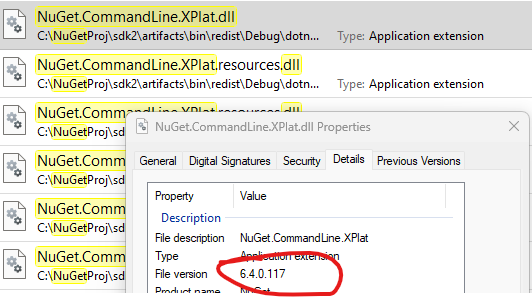
I tried to test locally build dotnet binary, but it's failing because it doesn't have latest nuget binary. Should I cherry-pick my change (NuGet/NuGet.Client#4855) to nuget 6.4 and create PR to merge to release/7.0.2xx? Or instead, I just continue with other sdk PR #28564 for sdk main branch? Currently our nuget asset inserted to sdk main branch only.
Fryi @nkolev92 @dsplaisted

image

.\dotnet.exe list C:\repos\NuGetApiTest\NuGetApiTest\NuGetApiTest.csproj package --format console
Specify --help for a list of available options and commands.
error: Unrecognized option '--format:console'


Usage: NuGet.CommandLine.XPlat.dll package list [arguments] [options]

Arguments:
  <PROJECT | SOLUTION>  A path to a project, solution file or directory.

Options:
  -h|--help               Show help information
  --force-english-output  Forces the application to run using an invariant, English-based culture.
  --framework             Specifies the target framework for which the packages will be listed.
  --deprecated            Displays only the packages marked deprecated by the authors.
  --outdated              Displays only the packages that need updates with the latest version from the sources.
  --vulnerable            Displays only the packages flagged as vulnerable.
  --include-transitive    Includes transitive packages too in the result.
  --include-prerelease    Considers prerelease versions when looking for latest. Works only with `--outdated`.
  --highest-patch         Considers only the versions with matching minor and major. Works only with `--outdated`.
  --highest-minor         Considers only the versions with matching major. Works only with `--outdated`.
  --source                Sources to lookup for latest versions. Works only with `--outdated`.
  --config                A path to a config file to specify sources. Works only with `--outdated`.
  --interactive           Allow the command to block and require manual action for operations like authentication.
  -v|--verbosity          Set the verbosity level of the command. Allowed values are q[uiet], m[inimal], n[ormal], d[etailed], and diag[nostic].

@nkolev92
Copy link
Contributor

I tried to test locally build dotnet binary, but it's failing because it doesn't have latest nuget binary. Should I cherry-pick my change (NuGet/NuGet.Client#4855) to nuget 6.4 and create PR to merge to release/7.0.2xx? Or instead, I just continue with other sdk PR #28564 for sdk main branch? Currently our nuget asset inserted to sdk main branch only.

I imagine the SDK will eventually setup rules so that our 6.5 insertions go in 7.0.2xx.

6.4 NuGet matches 7.0.1xx of the .NET SDK.

@erdembayar
Copy link
Contributor Author

I tried to test locally build dotnet binary, but it's failing because it doesn't have latest nuget binary. Should I cherry-pick my change (NuGet/NuGet.Client#4855) to nuget 6.4 and create PR to merge to release/7.0.2xx? Or instead, I just continue with other sdk PR #28564 for sdk main branch? Currently our nuget asset inserted to sdk main branch only.

I imagine the SDK will eventually setup rules so that our 6.5 insertions go in 7.0.2xx.

6.4 NuGet matches 7.0.1xx of the .NET SDK.

@baronfel @dsplaisted
Should I wait until nuget 6.5 start following into 7.0.2xx before merge? If I merge as it's now, then we'll get broken experience. We're already on 6.5 and it's currently being inserted into main.

@dsplaisted
Copy link
Member

@marcpopMSFT What do we need to do to set up flow from NuGet 6.5 into release/7.0.2xx? This PR is blocked on that I believe.

@marcpopMSFT
Copy link
Member

There is already codeflow for 17.5 to main and 7.0.2xx (see subscription d74d256b-6327-493c-3777-08daa2f83374). Nuget just controls when they promote a build to flow. @kartheekp-ms on whether there are 17.5 flows coming soon.

@kartheekp-ms
Copy link
Contributor

kartheekp-ms commented Nov 17, 2022

@erdembayar - I am bit confused. I assume this change should be made to main branch because NuGet side implementation for this work is inserted into dotnet/sdk main branch

<Dependency Name="NuGet.Build.Tasks" Version="6.5.0-preview.2.81">
release/7.0.2xx branch don't have the NuGet side implementation for dotnet list package json output functionality.

@marcpopMSFT - The url says https://github.com/dotnet/nuget.client instead of https://github.com/nuget/nuget.client for subscription id d74d256b-6327-493c-3777-08daa2f8337 (see the following command output). I think this is the reason why NuGet insertions into dotnet SDK are not flowing into release/7.0.2xx branch. Can we fix that please?

 darc get-subscriptions --ids d74d256b-6327-493c-3777-08daa2f83374
https://github.com/dotnet/nuget.client (VS 17.5) ==> 'https://github.com/dotnet/sdk' ('release/7.0.2xx')
VS 17.5 channel displays only `main` branch but not `release/7.0.2xx` branch because of the configuration error I mentioned above (AFAIK)
 darc get-subscriptions --target-repo dotnet/sdk --source-repo nuget/nuget.client --channel "VS 17.5"
https://github.com/nuget/nuget.client (VS 17.5) ==> 'https://github.com/dotnet/sdk' ('main')

@marcpopMSFT
Copy link
Member

Good catch as I didn't notice the type before. Fixed the dotnet and triggered: #29113

@erdembayar
Copy link
Contributor Author

erdembayar commented Nov 18, 2022

darc get-subscriptions --ids d74d256b-6327-493c-3777-08daa2f83374

Looks good now.

darc get-subscriptions --ids d74d256b-6327-493c-3777-08daa2f83374
https://github.com/nuget/nuget.client (VS 17.5) ==> 'https://github.com/dotnet/sdk' ('release/7.0.2xx')
  - Id: d74d256b-6327-493c-3777-08daa2f83374
  - Update Frequency: EveryBuild
  - Enabled: True
  - Batchable: False
  - PR Failure Notification tags:
  - Merge Policies:
    Standard
darc get-subscriptions --target-repo dotnet/sdk --source-repo nuget/nuget.client --channel "VS 17.5"
https://github.com/nuget/nuget.client (VS 17.5) ==> 'https://github.com/dotnet/sdk' ('main')
 - Id: fcb199f6-ff33-44a0-f3ef-08d8e97c775d
 - Update Frequency: EveryBuild
 - Enabled: True
 - Batchable: False
 - PR Failure Notification tags:
 - Merge Policies:
   Standard
 - Last Build: 6.5.0.81 (a487c8336b29a0e53dc46f4aab424fdd5de50e72)
https://github.com/nuget/nuget.client (VS 17.5) ==> 'https://github.com/dotnet/sdk' ('release/7.0.2xx')
 - Id: d74d256b-6327-493c-3777-08daa2f83374
 - Update Frequency: EveryBuild
 - Enabled: True
 - Batchable: False
 - PR Failure Notification tags:
 - Merge Policies:
   Standard

@erdembayar
Copy link
Contributor Author

@erdembayar - I am bit confused. I assume this change should be made to main branch because NuGet side implementation for this work is inserted into dotnet/sdk main branch

This one flow into main later.

@erdembayar
Copy link
Contributor Author

@dsplaisted
I can see #29113 is merged. Now is it safe to merge this PR?

@dsplaisted
Copy link
Member

I can see #29113 is merged. Now is it safe to merge this PR?

It would be good to add a sanity check test that verifies that the new option works correctly. Barring that, try testing locally again and see if it works (after merging in the latest changes from release/7.0.2xx).

@erdembayar
Copy link
Contributor Author

It would be good to add a sanity check test that verifies that the new option works correctly. Barring that, try testing locally again and see if it works (after merging in the latest changes from release/7.0.2xx).

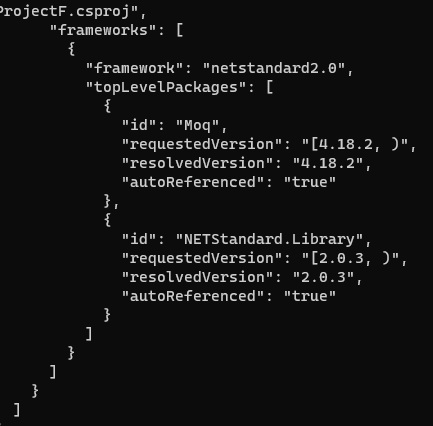
I can see actual json output now, so I'm merging now.
image

@erdembayar erdembayar merged commit 30f72c5 into release/7.0.2xx Nov 18, 2022
@erdembayar erdembayar deleted the dev-eryondon-add-dotnetlistpackage-formatoption2 branch November 18, 2022 19:49
@erdembayar
Copy link
Contributor Author

@dsplaisted
When do I expect sdk binary with this change?

@marcpopMSFT
Copy link
Member

If you mean an installable SDK, we need a CI build of 7.0.2xx first (I don't see one started for this PR yet), then codeflow into installer, then a ci build there. So half a day to a few days from now (we usually don't track individual changes that closely in codeflow).

@erdembayar
Copy link
Contributor Author

Where can I get latest nightly build?

@baronfel
Copy link
Member

@erdembayar the table with the various download links for the nightly SDK installers is here. I think there's a delay in the codeflow, though, blocked by this PR which has a lot of discussion about NuGet.Client and SourceBuild prebuilts, so I'm not sure that the version of 7.0.2xx listed in that table would have your changes yet.

Sign up for free to join this conversation on GitHub. Already have an account? Sign in to comment

Projects

None yet

Development

Successfully merging this pull request may close these issues.

7 participants