Skip to content

Conversation

@nhirokinet
Copy link
Contributor

@nhirokinet nhirokinet commented Oct 16, 2020

Tried to address #8563.

@nhirokinet nhirokinet force-pushed the feature/pwa-test branch 2 times, most recently from b433355 to ba39603 Compare October 16, 2020 15:36
@lzlrd
Copy link

lzlrd commented Oct 22, 2020

I gave this a try and while I do have #23520 applied, Chromium reports that it failed to get (GET, hehe) the Manifest icon:

Failures: Manifest icon failed to be fetched.

I manually tried to reach the URL stated in the manifest (/apps/theming/image/logo?v=51) and got a copy of the favicon (as a PNG).

EDIT: Ignore the above sentence.

Oh, and I had to add this to the NGINX server block:

location ~* (serviceworker\.js)$
{
        add_header Service-Worker-Allowed "/";
}

@nhirokinet
Copy link
Contributor Author

@lazerl0rd Oh, I've forgotten that I changed nginx.conf for that. Thank you for your comment!
add_header must be added because js file is served as static file.

@nhirokinet
Copy link
Contributor Author

For /apps/theming/image/logo?v=51 I couldn't find it in manifest in my environment. /apps/theming/favicon?v=8 and /apps/theming/icon?v=8 are referred. Did you find the URL in /apps/theming/manifest?

@lzlrd
Copy link

lzlrd commented Oct 22, 2020

For /apps/theming/image/logo?v=51 I couldn't find it in manifest in my environment. /apps/theming/favicon?v=8 and /apps/theming/icon?v=8 are referred. Did you find the URL in /apps/theming/manifest?

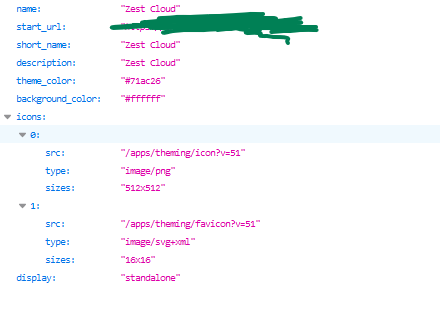
Yupp, my manifest is as follows:

image

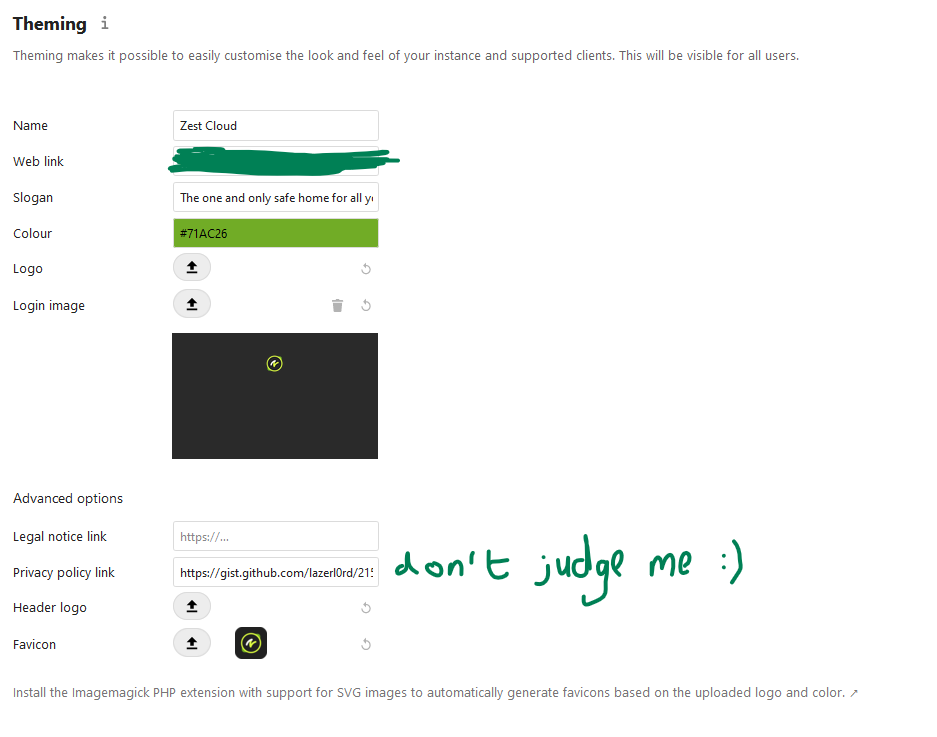
I'm not sure if it's a bug related to my theming options but here they are:

image

(the logo, header image, favicon, and login image are all manually set to different images). And yeah, I do have php-imagick up and running but Nextcloud didn't seem to auto-generate anything beforehand (maybe it's not working, for some reason).

PS: I manually just applied your two patches on top of the latest stable Nextcloud. Please do inform me if that means I'm missing something.

@nhirokinet
Copy link
Contributor Author

I'm not sure what is happening on your server, but if you mean /apps/theming/favicon?v=51 returns the icon with not 512x512 size, I met the same situation while my setup.

Auto resize in /app/theming/favicon requires php-imagick, with SVG support. In my Ubuntu 20.04 environment I needed to install libmagickcore in addition to php-imagick.

@lzlrd
Copy link

lzlrd commented Oct 24, 2020

I'm not sure what is happening on your server, but if you mean /apps/theming/favicon?v=51 returns the icon with not 512x512 size, I met the same situation while my setup.

Auto resize in /app/theming/favicon requires php-imagick, with SVG support. In my Ubuntu 20.04 environment I needed to install libmagickcore in addition to php-imagick.

The thing is, I have php-imagick and imagemagick installed (I use Arch, btw - this means that the library for imagick is integrated with the main package).

About my previous message, the logo/favicon/icon/whatever version number (?v=X) is irrlevant. It is used to denote a change and force the browser cache to "collect" the new image.

About the /apps/theming/image/logo?v=51 - please do ignore that. I was mixing up a few different images that Nextcloud provides by mistake.

I manually tried to reach /apps/theming/icon?v=X and /apps/theming/favicon?v=X which are defined in my manifest and can successfully reach them (albeit the same image - and size - appearing). I'm not sure if this is due to me passing Nextcloud PNGs instead of SVGs for the custom favicon/header/icon/etc. images.

@skjnldsv

This comment has been minimized.

@nhirokinet

This comment has been minimized.

@skjnldsv
Copy link
Member

skjnldsv commented Nov 2, 2020

Thanks!

Could you elaborate on how to test this pr?
And the purpose of said service worker? Because It looks like it is just catching and forwarding any fetch?
Thanks! :)

@nhirokinet
Copy link
Contributor Author

Testing environment is

  • server with proper HTTPS certificate
  • client with Google Chrome 86.0.4240.111 official build, 64bits, Windows 10.

Then install button is available on the address bar.

And the purpose of said service worker? Because It looks like it is just catching and forwarding any fetch?

Surely, it is just catching and forwarding any fetch, as you said. This is just to be installable PWA for desktop Chrome. Of course this is not ideal PWA, but I thought better than current status.

@szaimen
Copy link
Contributor

szaimen commented Nov 2, 2020

@nhirokinet is this for any app for "just" for the dashboard app? Great would be if it would work with any app because then not every app would need to implement this feature on its own :)
Would that be possible?

@nhirokinet
Copy link
Contributor Author

@szaimen This PR only works for dashboard, because manifest.json is already targeting dashboard.

Well... actually I want some features like non-official audio player to be run under PWA.

This pull request is intended not to make additional prevention for other app, but still giving nothing to enable other app.

In my limited idea at least:

  • manifest.json must be hosted by each app. Maybe adding some modification should be added to core to enable freely direct manifest.json to each app.
  • some interface to direct files to cache. this PR caches nothing, but for proper PWA both core js/img files and app data should be cached.

@szaimen
Copy link
Contributor

szaimen commented Aug 28, 2021

Superseded by #28459

@szaimen szaimen closed this Aug 28, 2021
Sign up for free to join this conversation on GitHub. Already have an account? Sign in to comment

Labels

Projects

None yet

Development

Successfully merging this pull request may close these issues.

4 participants