Skip to content

Conversation

@jd-alexander
Copy link
Contributor

@jd-alexander jd-alexander commented Nov 18, 2020

gutenberg: WordPress/gutenberg#26960
gutenberg-mobile: wordpress-mobile/gutenberg-mobile#2805
WPiOS: wordpress-mobile/WordPress-iOS#15291

Solution

This solution seeks to address the ability to add a file to the File Block from the device or WordPress media library utilizing the media picker components that are present within the codebase. This PR brings consistent file picking behavior between both the Consolidated Media Picker and the Normal Picker.

The primary changes are:

  1. introducing a SINGLE_FILE_PICKER type in the MediaBrowserType so the behavior that's specific to the File Block can be constrained by this picker type.

  2. For the MediaBrowserActivity when a single file is being selected the mBrowserType.isSingleFilePicker() flag is used to ensure the entire media list is loaded.

  3. showFilePicker now accepts canMultiSelect so that onAddFileClicked can pass the allowMultipleSelection

  4. The GutenbergEditor's WP Media Library FileButtonClicked behavior was wired to the media picker so that a picker with the WP Media Library as it's source could be created.

Testing

Before testing, I toggled the default value in the file ConsolidatedMediaPickerFeatureConfig to switch between each picker type.

Normal Media Picker (consolidated media picker disabled)

Picking local files.

  1. Create a new post.
  2. Add a File Block.
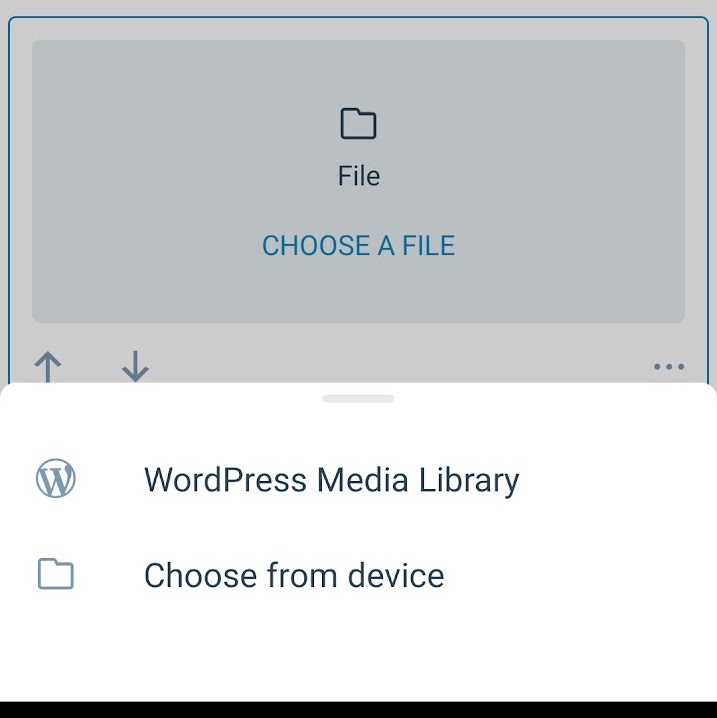
  3. Press Choose File.
  4. Select “Choose from device”.
  5. The System Picker should be visible.
  6. You should be able to pick a file.
  7. You should see the file name and the download button activated along with an upload progress.
  8. You can preview the post and download the file for further validation.

    Picking WP media library files
Select Option See Picker

Picking WP media files.

  1. Create a new post.
  2. Add a File Block.
  3. Press Choose File.
  4. Select “WordPress Media Library”
  5. Select a file.
  6. You should see the file name and the download button activated.
  7. You can preview the post and download the file for further validation.
Select Option See Picker

Consolidated Media Picker


Picking local files.

  1. Create a new post.
  2. Add a File Block.
  3. Press Choose File.
  4. Select “Choose from device”.
  5. The File Picker should be visible.
  6. You should be able to pick a file.
  7. You should see the file name and the download button activated along with an upload progress.
  8. You can preview the post and download the file for further validation.

Picking WP media library files
Select Option See Picker

Picking WP media picker files.

  1. Create a new post.
  2. Add a File Block.
  3. Press Choose File.
  4. Select “WordPress Media Library”
  5. Select a file.
  6. You should see the file name and the download button activated.
  7. You can preview the post and download the file for further validation.
Select Option See Picker

Reviewing

Only 1 reviewer is needed but anyone can review.

Submitter Checklist

  • I have considered if this change warrants user-facing release notes and have added them to RELEASE-NOTES.txt if necessary.
  • I have considered adding accessibility improvements for my changes.
  • If it's feasible, I have added unit tests.

@peril-wordpress-mobile
Copy link

peril-wordpress-mobile bot commented Nov 18, 2020

You can trigger optional UI/connected tests for these changes by visiting CircleCI here.

@peril-wordpress-mobile
Copy link

peril-wordpress-mobile bot commented Nov 19, 2020

You can test the changes on this Pull Request by downloading the APK here.

@jd-alexander jd-alexander changed the title [Gutenberg] File Block : WP Media Picker integration [Gutenberg] File Block : Consolidated Media Picker + WP Media Source integration Nov 19, 2020
@jd-alexander jd-alexander requested review from planarvoid and removed request for planarvoid November 19, 2020 07:35
@jd-alexander jd-alexander mentioned this pull request Nov 19, 2020
3 tasks
@jd-alexander jd-alexander marked this pull request as ready for review November 19, 2020 07:53
@planarvoid
Copy link
Contributor

hey @jd-alexander , the changes look good but I've tried the APK from this PR and I don't see the File block in the GB editor. Any idea how to get it there?

@jd-alexander
Copy link
Contributor Author

Hey @planarvoid I think in a case like this you might have to build Gutenberg from source. Is that enabled for you in gradle.properties?

wp.BUILD_GUTENBERG_FROM_SOURCE = true

@jd-alexander jd-alexander marked this pull request as draft November 20, 2020 06:28
@jd-alexander jd-alexander changed the base branch from gutenberg/after_1.41.0 to develop November 20, 2020 06:29
@jd-alexander
Copy link
Contributor Author

jd-alexander commented Nov 20, 2020

I just saw this error below while doing an upload. I am going to investigate it soon. It doesn't seem related to this PR though.

 WARN  Possible Unhandled Promise Rejection (id: 0):
"Unsupported path: /wp/v2/blocks?per_page=100&context=edit&_locale=user"

 WARN  Possible Unhandled Promise Rejection (id: 1):
"Unsupported path: /wp/v2/posts/1?context=edit&_locale=user"

 WARN  Network Error:  {
  "framesToPop": 1,
  "nativeStackAndroid": [
    {
      "methodName": "lambda$fetchRequest$1",
      "lineNumber": 285,
      "file": "RNReactNativeGutenbergBridgeModule.java",
      "class": "org.wordpress.mobile.ReactNativeGutenbergBridge.RNReactNativeGutenbergBridgeModule"
    },
    {
      "methodName": "accept",
      "lineNumber": 4,
      "file": null,
      "class": "org.wordpress.mobile.ReactNativeGutenbergBridge.-$$Lambda$RNReactNativeGutenbergBridgeModule$0lGvoMCv1-6Tgohm_CUyz143k0w"
    },
    {
      "methodName": "invoke",
      "lineNumber": 34,
      "file": "ReactNativeRequestHandler.kt",
      "class": "org.wordpress.android.ui.posts.reactnative.ReactNativeRequestHandler$performGetRequest$1$2"
    },
    {
      "methodName": "invoke",
      "lineNumber": 20,
      "file": "ReactNativeRequestHandler.kt",
      "class": "org.wordpress.android.ui.posts.reactnative.ReactNativeRequestHandler$performGetRequest$1$2"
    },
    {
      "methodName": "handleResponse",
      "lineNumber": 64,
      "file": "ReactNativeRequestHandler.kt",
      "class": "org.wordpress.android.ui.posts.reactnative.ReactNativeRequestHandler"
    },
    {
      "methodName": "access$handleResponse",
      "lineNumber": 20,
      "file": "ReactNativeRequestHandler.kt",
      "class": "org.wordpress.android.ui.posts.reactnative.ReactNativeRequestHandler"
    },
    {
      "methodName": "invokeSuspend",
      "lineNumber": 34,
      "file": "ReactNativeRequestHandler.kt",
      "class": "org.wordpress.android.ui.posts.reactnative.ReactNativeRequestHandler$performGetRequest$1"
    },
    {
      "methodName": "resumeWith",
      "lineNumber": 33,
      "file": "ContinuationImpl.kt",
      "class": "kotlin.coroutines.jvm.internal.BaseContinuationImpl"
    },
    {
      "methodName": "afterResume",
      "lineNumber": 214,
      "file": "Builders.common.kt",
      "class": "kotlinx.coroutines.UndispatchedCoroutine"
    },
    {
      "methodName": "resumeWith",
      "lineNumber": 113,
      "file": "AbstractCoroutine.kt",
      "class": "kotlinx.coroutines.AbstractCoroutine"
    },
    {
      "methodName": "resumeWith",
      "lineNumber": 46,
      "file": "ContinuationImpl.kt",
      "class": "kotlin.coroutines.jvm.internal.BaseContinuationImpl"
    },
    {
      "methodName": "run",
      "lineNumber": 56,
      "file": "DispatchedTask.kt",
      "class": "kotlinx.coroutines.DispatchedTask"
    },
    {
      "methodName": "runSafely",
      "lineNumber": 571,
      "file": "CoroutineScheduler.kt",
      "class": "kotlinx.coroutines.scheduling.CoroutineScheduler"
    },
    {
      "methodName": "executeTask",
      "lineNumber": 738,
      "file": "CoroutineScheduler.kt",
      "class": "kotlinx.coroutines.scheduling.CoroutineScheduler$Worker"
    },
    {
      "methodName": "runWorker",
      "lineNumber": 678,
      "file": "CoroutineScheduler.kt",
      "class": "kotlinx.coroutines.scheduling.CoroutineScheduler$Worker"
    },
    {
      "methodName": "run",
      "lineNumber": 665,
      "file": "CoroutineScheduler.kt",
      "class": "kotlinx.coroutines.scheduling.CoroutineScheduler$Worker"
    }
  ],
  "userInfo": {
    "message": "rest_post_invalid_id",
    "code": 404
  },
  "message": null,
  "code": "404"
}

@jd-alexander jd-alexander marked this pull request as ready for review November 20, 2020 06:49
@jd-alexander jd-alexander added this to the 16.3 milestone Nov 20, 2020
@planarvoid
Copy link
Contributor

hey @jd-alexander , why would that be necessary? I just want to test the changes. Why wouldn't everything be in the APK on this PR? Should this flag be enabled for the Jalapeno build?

@jd-alexander
Copy link
Contributor Author

hey @jd-alexander , why would that be necessary? I just want to test the changes. Why wouldn't everything be in the APK on this PR? Should this flag be enabled for the Jalapeno build?

Good question! I moved the conversation into Slack to verify that this isn't necessary so I can make testing easier for you 😄

@jd-alexander jd-alexander modified the milestones: 16.3, 16.4 Nov 24, 2020
Copy link
Contributor

@planarvoid planarvoid left a comment

Choose a reason for hiding this comment

The reason will be displayed to describe this comment to others. Learn more.

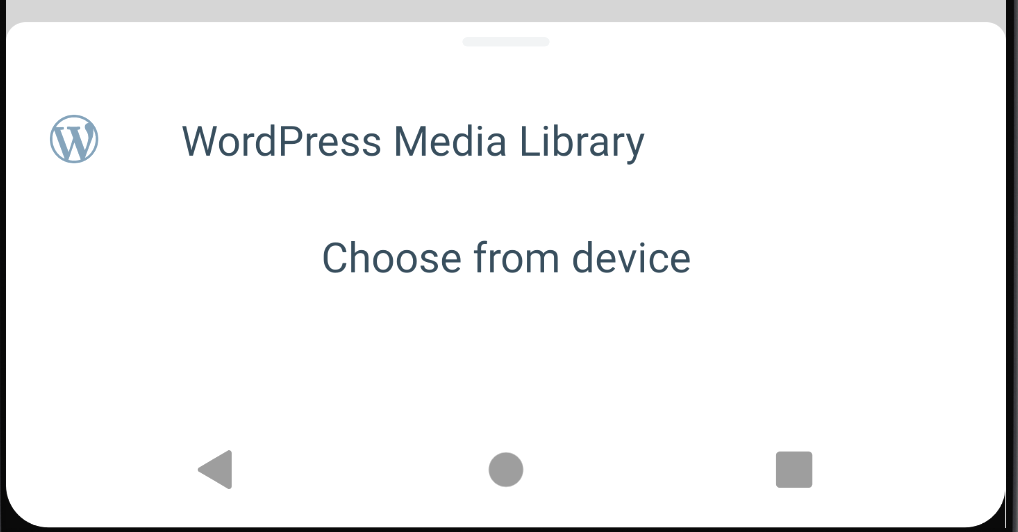
I've tested the file block picker and it's looking good. The only thing looking weird is that the "Choose from device" option is moved to the right (it's like that even in your PRs). Any idea why that's happening @jd-alexander ?
Screenshot 2020-11-24 at 09 57 33

@etoledom
Copy link
Contributor

etoledom commented Nov 24, 2020

The only thing looking weird is that the "Choose from device" option is moved to the right

That's right, an icon missing there.
I'm adding a file icon. @iamthomasbishop - what do you think?

Screenshot_20201124-141006

@iamthomasbishop
Copy link

@etoledom I think we're already using a "mobile phone" icon (or similar...I don't have my Android phone on me to check 😄) for other instances of the "choose from device" option, so we can use that same icon and label here.

@jd-alexander
Copy link
Contributor Author

The changes mentioned above have been implemented here

@etoledom
Copy link
Contributor

Thank you @jd-alexander for the update!
I have updated the branch with the latest reference to gutenberg.

@planarvoid - could you please take another look? Thanks!

@etoledom etoledom requested a review from planarvoid November 25, 2020 12:17
Copy link
Contributor

@etoledom etoledom left a comment

Choose a reason for hiding this comment

The reason will be displayed to describe this comment to others. Learn more.

Smoke tested and its working great to me.
@planarvoid - if you are happy with the code side of things, let's go ahead :shipit:

@etoledom etoledom changed the base branch from develop to gutenberg/after_1.42.0 November 25, 2020 12:18
@etoledom
Copy link
Contributor

Moved this to target gutenberg/after_1.42.0

Sign up for free to join this conversation on GitHub. Already have an account? Sign in to comment

Projects

None yet

Development

Successfully merging this pull request may close these issues.

5 participants