[RNMobile] Add "Set as Featured" Button to Image Block #16426
Conversation


This protocol includes a method named didSetFeaturedImage, which will send a message to the JS side when a featured image is set from Post Settings.
… data over the bridge
The intention behind this change is to make the function's purpose clearer. It also moves the naming inline to this feature's Android counterpart. (See: wordpress-mobile/WordPress-Android#14451.)
…eId"

This change is a bid align closer to the naming conventions of other functions in iOS.
…to gutenberg/add/featured-badge
This function will handle the logic for setting/removing a featured when the button is tapped.

|
You can trigger optional UI/connected tests for these changes by visiting CircleCI here. |
|
You can trigger an installable build for these changes by visiting CircleCI here. |
This function accepts a media ID for an image and uses the "existingMediaWith" to determine its media object, which can then be used to assign the image as the post's featured image. Lastly, the ID of the new featured image is then sent to Gutenberg via featuredImageIdNativeUpdated().
This commit includes different notices that will be sent to Gutenberg, depending on whether an image is being removed (which will be the case when the media ID is zero) or set.
This function will be called when a post already has a featured image and will prompt the user on whether they wish to replace the current featured image or not.
This commit introduces logic into the gutenbergDidRequestToSetFeaturedImage() function. Specifically, an if/else statement is used to either set, remove, or show an alert to confirm a replacement, depending on the state of featured images in the post.
 SiobhyB
changed the title
SiobhyB
added
Gutenberg
SiobhyB
changed the title
SiobhyB
added
Gutenberg

|
Just a heads-up that the unit tests seem to be failing and I'm seeing an error when the block editor opens. Once this is done I can test the Tracks events which I'd forgotten to do in the first review.
|
…to gutenberg/add/set-as-featured-button
…to gutenberg/add/set-as-featured-button
It's necessary to dismiss then present controller at the moment due to an issue with BottomSheet. See hee for further discussion: https://github.com/wordpress-mobile/WordPress-iOS/pull/16426/files#r643544481

With this commit, the logic around dismissing the controller is refactored to make use of the completion handler.

An if/else statment is used to account for any cases where a controller isn't present (i.e. if the issue with BottomSheet is fixed in the future).

|
@guarani, sorry for missing that error. 🤦♀️ I've double-checked and everything should work without error with the latest changes on this branch now. |
Tested 287307b:
|
iPads display action sheets inside a popover, which wasn't accounted for in the code, leading to a crash when the 'replace featured' dialog was called.

The crash is fixed with this commit, which introduces support for iPad's popovers.
…to gutenberg/add/set-as-featured-button
This commit refactors the code for iPad-specific popoverController. It's now more inline with similar code elsewhere in the GutenbergViewController.swift file, for example here:

https://github.com/wordpress-mobile/WordPress-iOS/blob/develop/WordPress/Classes/ViewRelated/Gutenberg/GutenbergViewController.swift#L746
|
@guarani, this is ready for the next review when you have a chance. :) I've updated all the PRs in this chain so that they're up-to-date following HACK week and my recent AFK. The most recent changes also include a fix for the iPad-specific crash you surfaced. |
|
Highlighting that I found an issue where the button breaks the editor's undo/redo functionality, which I'll work on in a separate issue. I'd like to propose merging this issue into the main feature branch (if no other issues are found in this PR chain) irrespective of that particular known issue, as it'll be worked on separately to this. |

 guarani
left a comment
guarani
left a comment
guarani
left a comment
There was a problem hiding this comment.
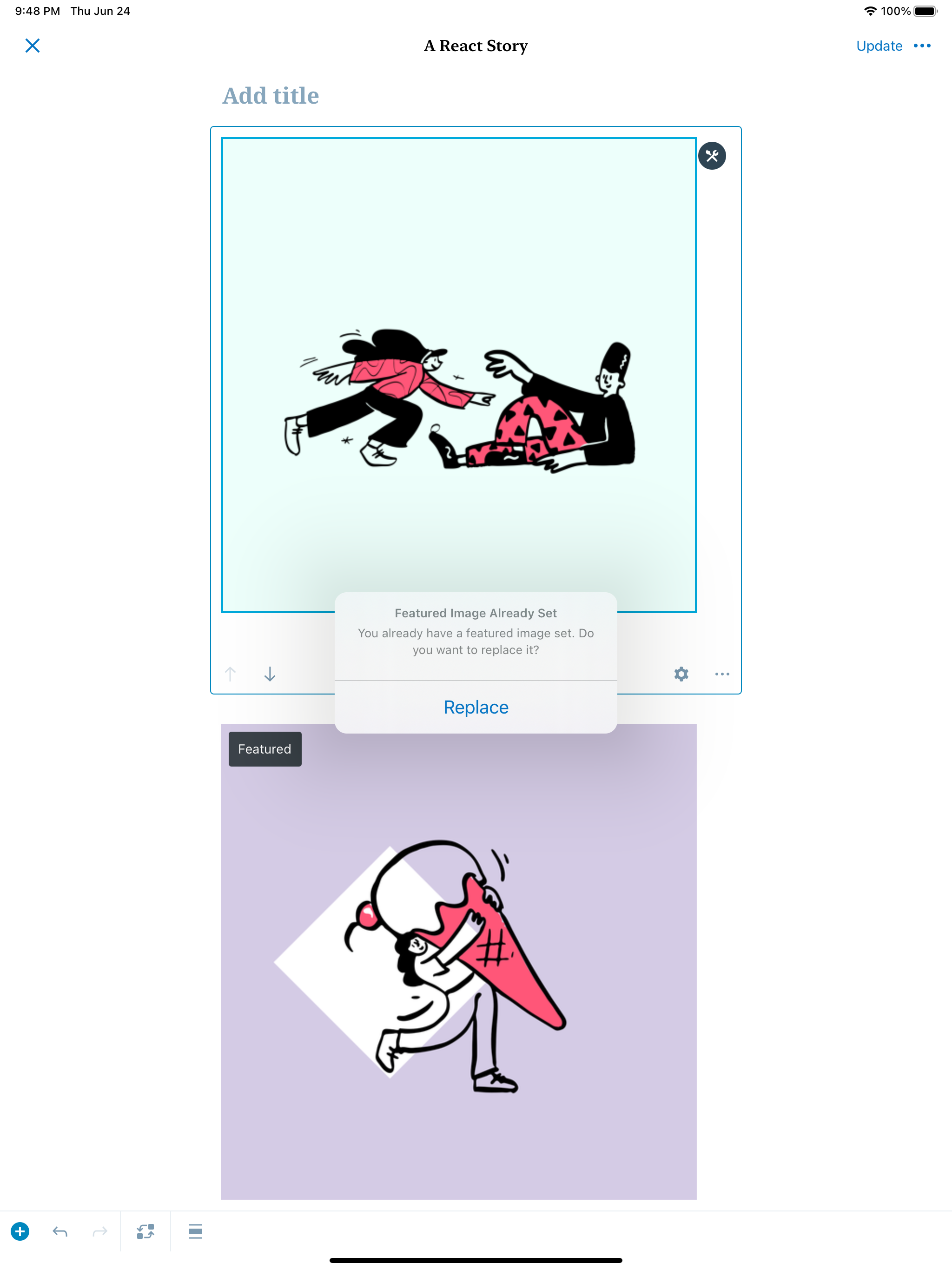
I tested this on an iPad and the replace action sheet is being shown right at the top of the screen which looks incorrect.
RPReplay_Final1624555904.MP4
With this commit, the iPad-specific popoverController is centred in the middle of the screen. The "permittedArrowDirections" value is also changed to remove any arrow and ensure the dialog's message is displayed in full (rather than only the title).
|
Thanks @guarani, I've gone ahead to make some changes in 8f47364 so that the dialog is always centred in the screen. I also removed the arrow so that the message is displayed (rather than only the title, which seems to happen when an arrow is specified), which I think looks a bit better in this case:
Let me know what you think! |
guarani
left a comment
guarani
left a comment
There was a problem hiding this comment.
Code looks great and works as expected! 💯
Approved via WordPress/gutenberg#31415 (review)
Thanks @SiobhyB!


Paritial fix for: wordpress-mobile/gutenberg-mobile#1011
gutenberg: WordPress/gutenberg#31415gutenberg-mobile: wordpress-mobile/gutenberg-mobile#3450The main PR for the branch this individual PR will be merged into,
add/featured-functionality-to-image-block-ios, can be found here: #16427Description
This PR will add a Set as Featured button to the image block's settings on iOS devices, with the purpose being to make it simpler for users to set a featured image within the post's editor. Users will also be able to Remove as Featured directly from the block's setting.
Testing
Main Test Flows
The Gutenberg PR can be referred to as the central, most up-to-date repository for the main test flows. In addition, we should verify that the Tracks events edited/introduced with this PR work as expected.
Tracks Verification
wpios_editor_post_featured_image_changedinto the tool's Events field and then the username associated with the account you tested with in the Username field. Click Search.-- action should either log
removedoradded, depending on whether you have removed or set a featured image.-- via should log
gutenbergwhen you set/remove a featured image via the image block orsettingswhen this is done via Post Settings.Regression Notes
As this PR adds another flow for users to set/remove featured images, there is some potential for it to unintentionally have a negative impact on the existing flow (found via Post Settings).
Another unintended area of impact is the
wpios_editor_post_featured_image_changedTrack event. This event currently only fires when a featured image is changed via Post Settings. With this PR, it should also be fired when a featured image is changed via the image block, with agutenbergproperty to differentiate it.The steps taken to test whether the intended flow works as expected can be found in the Gutenberg PR with additional steps for verifying the Tracks event fires as expected listed above.
N/A
PR submission checklist:
RELEASE-NOTES.txtif necessary.