Skip to content

Conversation

@kbrown9
Copy link
Member

@kbrown9 kbrown9 commented Jul 17, 2020

Changes proposed in this Pull Request:

  • Add a CRM Connection setting to the Advanced section in the Contact Form block sidebar. The setting will allow the user to enable and disable the form's integration with a CRM.

Jetpack product discussion

  • pbhBOz-b7-p2

Does this pull request change what data or activity we track or use?

  • No.

Testing instructions:

Test Site
  1. Install, activate, and connect this branch.
  2. Create a post, add a Jetpack form block, and publish the post. The form must have an email field.
Test with CRM <v3.0.19 (no form integration is available)
  1. Install Jetpack CRM v3.0.18. (don't activate yet).
  2. Navigate to the post created above. Navigate to the form sidebar and open the CRM Integration section. Confirm that it suggests that you update the CRM plugin.
  3. Activate Jetpack CRM.
  4. Navigate to CRM -> Manage Extensions. Activate the Jetpack Form extension, which is found at the bottom of the page, in the Core Modules section.
  5. Navigate to the post created above. Navigate to the form sidebar and open the CRM Integration section. Confirm that it suggests that you update the CRM plugin.
  6. Navigate to the form post. Fill out the form and submit it.
  7. Navigate to wp-admin -> Feedback and confirm that the form submission is displayed.
  8. Confirm that no errors were generated in the console and debug.log.
Test with CRM v4.0 (form integration is available)
  1. Install Jetpack CRM v4.0. (don't activate yet)
  2. Navigate to the post created above. Navigate to the form sidebar and open the CRM Integration section. Confirm that it suggests that you activate the CRM plugin.
  3. Activate Jetpack CRM.
  4. Navigate to CRM -> Manage Extensions. Activate the Jetpack Form extension, which is found at the bottom of the page, in the Core Modules section.
  5. Navigate to the post created above. Navigate to the form sidebar and open the CRM Integration section. Confirm that it informs you that the form can be integrated with the CRM.
  6. Navigate to the form post. Fill out the form and submit it.
  7. Navigate to wp-admin -> Feedback and confirm that the form submission is displayed.
  8. Navigate to CRM -> contacts. Confirm that a new contact was created with the email address that you submitted.
  9. Confirm that no errors were generated in the console and debug.log.
Test with Jetpack CRM PR 756
  1. Install and activate the Jetpack CRM branch in PR 756.
  2. Manually change the Jetpack CRM plugin version so something greater than 4.0.
  3. Navigate to CRM -> Manage Extensions. Activate the Jetpack Form extension, which is found at the bottom of the page, in the Core Modules section.
Test with the toggle switch on.
  1. Navigate to the post created above. Navigate to the form sidebar and open the CRM Integration section. Confirm that it informs you that the form can be integrated with the CRM. Also, a toggle switch should be displayed, and it should default to 'on'.
  2. Navigate to the form post. Fill out the form and submit it.
  3. Navigate to wp-admin -> Feedback and confirm that the form submission is displayed.
  4. Navigate to CRM -> contacts. Confirm that a new contact was created with the email address that you submitted.
Test with the toggle switch off.
  1. Navigate to the post created above. Navigate to the form sidebar and open the CRM Integration section. Turn the toggle switch off.
  2. Navigate to the form post. Fill out the form and submit it.
  3. Navigate to wp-admin -> Feedback and confirm that the form submission is displayed.
  4. Navigate to CRM -> contacts. Confirm that a new contact was not created for the email address that you submitted.
  5. Confirm that no errors were generated in the console and debug.log.

Proposed changelog entry for your changes:

  • tbd

@kbrown9 kbrown9 added [Type] Enhancement Changes to an existing feature — removing, adding, or changing parts of it [Feature] Contact Form [Status] In Progress [Pri] Normal labels Jul 17, 2020
@kbrown9 kbrown9 added this to the 8.8 milestone Jul 17, 2020
@kbrown9 kbrown9 requested a review from georgestephanis as a code owner July 17, 2020 21:52
@kbrown9 kbrown9 self-assigned this Jul 17, 2020
Copy link

@test-case-reminder test-case-reminder bot left a comment

Choose a reason for hiding this comment

The reason will be displayed to describe this comment to others. Learn more.

Here are some suggested test cases for this PR.

Contact Form

  • Publish a post with default form block
  • Edit a post that includes a block that was created with a previous version of the plugin
  • Submit a form via frontend using form block
  • Check different predefined form types
  • Verify it renders as expected in both non-AMP and AMP views
  • Check in mobile view
  • Check in a older version of WordPress
  • Check with the Gutenberg plugin
  • Check without the Gutenberg plugin
  • Check in IE11

If you think that suggestions should be improved please edit the configuration file here. You can also modify/add test-suites to be used in the configuration file.

@jetpackbot
Copy link
Collaborator

jetpackbot commented Jul 17, 2020

Thank you for the great PR description!

When this PR is ready for review, please apply the [Status] Needs Review label. If you are an a11n, please have someone from your team review the code if possible. The Jetpack team will also review this PR and merge it to be included in the next Jetpack release.

E2E results is available here (for debugging purposes): https://jetpack-e2e-dashboard.herokuapp.com/pr-16519

Scheduled Jetpack release: August 4, 2020.
Scheduled code freeze: July 28, 2020

Generated by 🚫 dangerJS against d43f92a

@kbrown9 kbrown9 force-pushed the update/add_crm_toggle branch 2 times, most recently from 11a3f2e to 0afa6c3 Compare July 23, 2020 15:21
Add a CRM Connection setting to the Advanced section in the Contact Form block sidebar.
The setting will allow the user to enable and disable the form's integration with the CRM plugin.
@kbrown9 kbrown9 force-pushed the update/add_crm_toggle branch from 0afa6c3 to d43f92a Compare July 27, 2020 05:23
@kbrown9 kbrown9 added [Status] Needs Review This PR is ready for review. and removed [Status] In Progress labels Jul 27, 2020
@dereksmart dereksmart requested a review from woodyhayday July 27, 2020 13:34
Copy link
Contributor

@dereksmart dereksmart left a comment

Choose a reason for hiding this comment

The reason will be displayed to describe this comment to others. Learn more.

Tested all 3 scenarios, and works as expected.

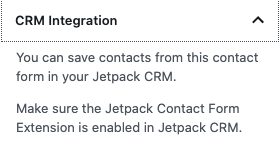
For the future, we should re-visit this text when the extension is active. It made me feel like I needed to activate it, though it already was. Also the spacing at the top seems off
image

Tested the toggle both on and off - confirmed intended behavior.

@jeherve FYY I asked Avengers to test it out, but they don't have the bandwidth to do it before code freeze and said they'd be on the lookout to test in the beta.

@dereksmart dereksmart added [Status] Ready to Merge Go ahead, you can push that green button! and removed [Status] Needs Review This PR is ready for review. labels Jul 27, 2020
@matticbot
Copy link
Contributor

Caution: This PR has changes that must be merged to WordPress.com
Hello kbrown9! These changes need to be synced to WordPress.com - If you 're an a11n, please commandeer and confirm D46945-code works as expected before merging this PR. Once this PR is merged, please commit the changes to WP.com. Thank you!
This revision will be updated with each commit to this PR

@jeherve
Copy link
Member

jeherve commented Jul 31, 2020

r211436-wpcom

Sign up for free to join this conversation on GitHub. Already have an account? Sign in to comment

Labels

[Feature] Contact Form [Plugin] CRM Issues about the Jetpack CRM plugin [Pri] Normal Touches WP.com Files [Type] Enhancement Changes to an existing feature — removing, adding, or changing parts of it

Projects

None yet

Development

Successfully merging this pull request may close these issues.

6 participants